

SEO-friendly web design is simply the practice of building websites that search engines like Google can easily find, understand, and show to people. The whole point is to rank higher in organic search, which starts with making your site a breeze for search engine bots to crawl and index.
What SEO-Friendly Web Design Really Means
Imagine you’ve just opened a fantastic new retail store. The products are amazing, your team is ready, but you built it down a hidden alley with no signs, cramped doorways, and messy shelves. Even if a few people stumble in, they'll get frustrated and leave. No one will ever find you.
SEO-friendly web design is like building that same store on a busy main street. It has big, clear signs, wide aisles, and a layout that makes sense. It’s a place people and search engines want to visit.
It’s about building a site that not only looks great but is structured in a way that search engines can instantly grasp what you're about. This goes way beyond just sprinkling in a few keywords. It’s about building a rock-solid foundation so Google can crawl your pages, figure out what they mean, and confidently rank them for the right searches.
The Three Pillars of a Search-Optimized Website
A truly effective website has to do three things well at once: satisfy search engine crawlers, deliver high-quality content, and give human visitors a great experience. These aren't separate goals—they're completely intertwined. If you drop the ball on one, the other two suffer.
This flowchart shows how a site’s technical guts, its content, and its user-friendliness all have to work together.
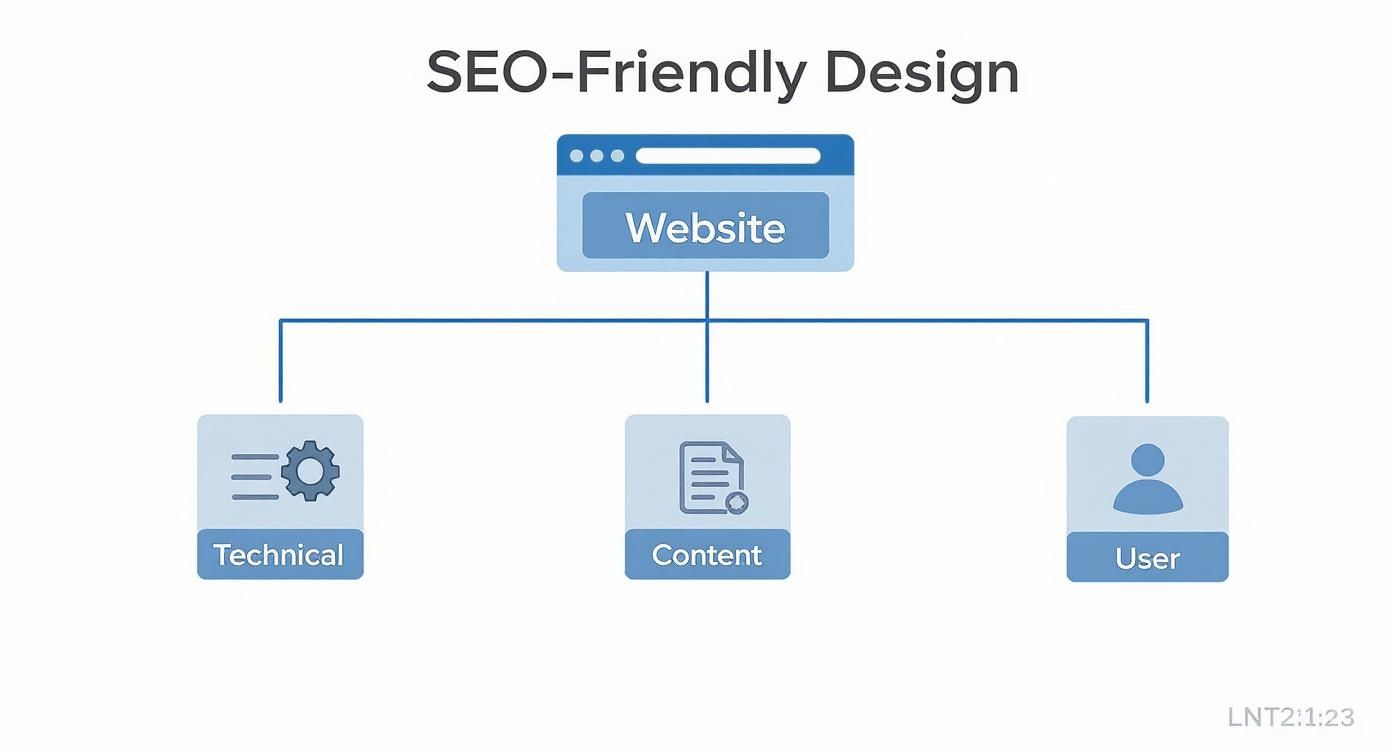
As you can see, the sweet spot is right in the middle, where technical excellence, valuable content, and a seamless user experience all meet.
To give a clearer picture, let's break down the core components that make a website "SEO-friendly."
| Pillar | Primary Goal | Key SEO Impact |
|---|---|---|
| Technical SEO | Ensure the site is fast, secure, and easily crawlable. | Improves indexing, site speed signals, and search engine trust. |
| User Experience (UX) | Make the site intuitive, mobile-friendly, and easy to navigate. | Boosts engagement signals (time on page, low bounce rate), which Google values. |
| On-Page SEO & Content | Create high-quality content that directly answers user queries. | Establishes relevance and authority for target keywords, driving organic traffic. |
| Information Architecture | Organize content logically so users and bots can find what they need. | Enhances crawlability and distributes page authority effectively. |
These pillars aren't just a checklist; they form the very foundation of a website that can compete and win in search results.
Why SEO Must Be Part of the Design Process
So often, business owners treat SEO as an afterthought—something you bolt on once the pretty new website is finished. That’s like trying to install the plumbing after the drywall is up. It’s messy, expensive, and never works as well as it should.
When SEO and web design work in harmony from day one, you create a powerful digital asset that serves both users and search engines. This alignment is what transforms a simple website into a 24/7 lead generation tool.
When SEO is baked into the design process from the very beginning, every choice—from the site structure and URLs to mobile responsiveness and page speed—works toward the same goal: getting found by the right people and turning them into customers.
To get a complete picture of what goes into an effective online presence, check out these 9 best practices web design tips that cover UX, performance, and SEO. By getting these fundamentals right from the start, you build a powerful online platform that actually grows your business.
Building a Solid Technical SEO Foundation
Every great website is built on a strong technical foundation, much like a well-constructed house. This isn't the flashy stuff your visitors see, but it’s absolutely critical for search engines like Google. A solid technical SEO setup is what allows search engine crawlers to find, understand, and index every important page on your site. Without it, you're basically invisible.
Think of it like building a new retail store. You could have the best products and the friendliest staff, but if the aisles are a confusing mess, the lighting is poor, and the doors are hard to find, customers won't stick around. Technical SEO is the practice of designing that store layout so it’s easy for everyone—both shoppers and search engines—to navigate.

When done right, you transform your website from a chaotic maze into a perfectly organized resource, primed and ready for discovery.
Mastering Your Site Architecture
First things first, you need a logical site architecture. This is simply the hierarchy of your pages and how they link together. The goal is a clean, shallow structure where any page is reachable within just a few clicks from the homepage.
Imagine burying a key service page four or five levels deep. It’s like hiding your best-selling product in the back of a storeroom—Google will assume it’s not important. A well-planned structure keeps your most valuable content front and center, signaling its importance loud and clear.
This intuitive flow doesn't just help search bots; it makes for a much better user experience. Visitors can find what they need without getting frustrated, which means they'll stay on your site longer.
Creating Clean and Descriptive URLs
Your website's URLs are the street addresses for your content. An SEO-friendly design relies on clean, readable URLs that tell you exactly what the page is about. Keep them simple, use relevant keywords, and ditch the confusing parameters or random numbers.
For instance, which of these addresses is easier to find?
- Poor URL:
https://yourcompany.com/index.php?category=2&id=789 - Good URL:
https://yourcompany.com/services/austin-residential-roofing
The second one instantly tells both users and search engines what to expect. This small detail reinforces your page's relevance and makes your site feel more professional and trustworthy.
A well-structured URL acts as its own anchor text, providing valuable context to search engines before they even crawl the page content. It’s one of the simplest yet most effective technical SEO wins you can achieve.
By making your URLs descriptive, you build a more intuitive map of your site and strengthen its overall relevance.
Guiding Crawlers with Sitemaps and Robots.txt
Even with a perfect site structure, you still need to hand Google a map. An XML sitemap is a file that lists every important URL on your website, acting as a direct roadmap for search crawlers. It ensures no page gets left behind, especially new content that might not have many internal links yet.
While the sitemap invites crawlers in, the robots.txt file is your friendly gatekeeper. This simple text file tells search bots which areas of your site they shouldn't crawl, like admin login pages, internal search results, or duplicate content you don't want indexed.
Using these two tools in tandem gives you precise control:
- XML Sitemap: "Hey Google, here are all the important pages you should definitely look at."
robots.txt: "Please ignore these specific sections; they aren't for the public."
This strategic guidance helps search engines use their limited crawl budget efficiently by focusing only on the content you actually want to rank. For a deeper dive, our guide on technical SEO best practices lays out a more detailed roadmap. Mastering these fundamentals ensures your website isn't just well-built but also perfectly primed for search engine success.
Winning Users with Speed and Mobile-First Design
In the world of SEO-friendly web design, speed isn't just a feature—it’s the entire experience. Today’s users expect instant answers, and search engines like Google are built to reward the websites that deliver them. A slow, clunky site doesn't just annoy a visitor; it actively tells Google you're not the right choice.
Think of your website's loading time as the first handshake with a potential customer. If they have to wait more than a couple of seconds for your page to load, they’re gone. They’ll hit the "back" button before they ever see what you have to offer. Google sees this behavior—called a bounce—and takes it as a clear signal that your page wasn't a good answer to their question.
The Mobile-First Mandate
The shift to mobile browsing isn't just a trend anymore; it's the reality. Because of this, Google now uses what's called mobile-first indexing. This simply means Google primarily looks at the mobile version of your site to decide how to rank it, even for people searching on a desktop. Your mobile site isn’t a stripped-down afterthought—in Google's eyes, it’s the main event.
A design that looks stunning on a 30-inch monitor but is a broken, slow, or frustrating mess on a phone is a recipe for SEO disaster. Every single element, from the size of your buttons to how your menu works, has to be designed for the small screen to give users a smooth, productive journey.
The financial stakes here are incredibly high. For instance, responsive websites see an 11% higher conversion rate on average because they don't fight mobile users. With over 61% of global web traffic coming from mobile devices, a poor mobile experience translates directly into lost money. In the U.S. alone, slow-loading websites cost retailers an estimated $2.6 billion every year. You can dig into more web design statistics and insights on Hostinger to see just how big the impact is.
Actionable Steps for a Faster Website
Boosting your site's speed is one of the single most impactful technical SEO improvements you can make. It's not about finding one magic bullet but making a series of smart optimizations that add up to a much quicker experience. The good news is, most of this is entirely within your control.
Here are a few high-impact strategies to get started:
- Optimize Your Images: Huge, uncompressed images are the number one culprit behind slow websites. Use modern formats like WebP, and make sure every single image is compressed to shrink its file size without destroying its quality.
- Leverage Browser Caching: This tells a visitor's browser to save parts of your website (like your logo and other core files) on their device. When they come back, their browser can load those files locally instead of re-downloading them, making return visits feel instantaneous.
- Minify Your Code: Minification is a fancy word for cleaning up your code. It strips out all the unnecessary characters from your HTML, CSS, and JavaScript files—things like spaces, comments, and line breaks that machines don't need to read. Lighter code means faster processing.
A one-second delay in page load time can lead to a 7% reduction in conversions. For an e-commerce store making $100,000 per day, that single second could cost over $2.5 million in lost sales every year.
By making these technical improvements a priority, you directly improve the experience for your users. That, in turn, sends all the right signals to search engines. For a deeper dive, you can learn more about the importance of speed and performance for your website in our dedicated guide.
At the end of the day, a fast, mobile-friendly design is no longer a "nice-to-have"—it's a fundamental requirement for succeeding online.
Boosting Visibility with On-Page SEO and Schema
If your website's technical foundation is the stage, then on-page SEO and Schema markup are the script and the stage directions. You've built a fast, mobile-friendly site that search engines can easily access. Now, it's time to tell them—and your visitors—what the show is all about.
This is where you transform your well-built pages into compelling, highly visible listings that searchers can't resist clicking.
Think of your website as a book. Your technical SEO is the quality of the paper and binding. On-page SEO is the compelling title, the captivating summary on the back cover, and the well-organized chapter headings that draw the reader in. It’s the art of signaling to both people and search engines exactly what your content is about and why it’s worth their time.

This process involves fine-tuning all the individual elements on each page, making them as clear, relevant, and persuasive as possible.
Mastering the Core On-Page Elements
The first thing a potential customer sees in the search results is your page's title and description. This is your first—and maybe only—chance to make a great impression. An SEO-friendly web design sweats the small stuff, especially these crucial components.
- Title Tags: This is the clickable headline in a Google search result. It needs to be punchy and clear—ideally under 60 characters—while including your main keyword and giving someone a solid reason to click.
- Meta Descriptions: This is the short summary that appears right below the title. While it won't directly boost your rankings, a well-written meta description acts like ad copy. It entices clicks by clearly summarizing what the user will find on the page.
- Header Tags (H1, H2, H3): Headers give your content structure. They make it scannable for human readers and help search engines understand the hierarchy of your information. Your H1 is your page's main headline, while H2s and H3s break the content into logical subtopics.
These elements work in concert to tell a clear story to search engines, confirming that your page is a perfect match for a specific query. For a deeper dive, there are great resources on technical on-page SEO that cover these details.
Unlocking Rich Results with Schema Markup
While basic on-page elements tell search engines what your page is about, Schema markup (also known as structured data) tells them what your content is. It's a specific vocabulary of code you add to your site to provide explicit context.
Think of it like adding detailed labels to your content for a blindfolded librarian. Instead of just seeing a number like "4.5," Schema tells Google, "This number is an average star rating from 50 reviews." Instead of just seeing a block of text, it says, "This text is the answer to a frequently asked question."
Schema markup translates your human-readable content into a language search engines can understand instantly. This allows them to feature your site in special search results, known as rich results, that stand out from the standard blue links.
This powerful translation enables Google to display your content in more visually appealing and informative ways, right on the search results page.
The Competitive Advantage of Rich Results
Getting structured data right gives you a serious leg up. Experts predict that by 2025, an estimated 72% of first-page Google search results will feature Schema markup, which is what powers rich results like review stars, FAQs, pricing, and event details.
Despite this clear trend, nearly a quarter of all websites still haven't implemented any structured data. That's a huge opportunity just sitting on the table.
These enhanced listings do more than just look pretty. They deliver real results:
- Increase Click-Through Rate (CTR): Rich results are eye-catching. They give users more information upfront, making them far more likely to click your listing over a plain one.
- Build Trust Instantly: Seeing five-star ratings, clear pricing, or event dates directly in the search results builds credibility before a user even lands on your site.
- Dominate More SERP Real Estate: Features like FAQ dropdowns or detailed product listings take up more physical space on the results page, pushing your competitors further down.
By integrating both foundational on-page SEO and advanced Schema markup, your SEO-friendly design moves beyond being merely functional to being truly competitive and compelling.
Designing an Accessible and Engaging Experience
A truly great website doesn't just work for search engines—it has to work for everyone. It's easy to get lost in the technical weeds of SEO, but one of the most powerful signals you can send to Google is that you've built a site that's helpful and easy for all people to use.
When we connect the dots between web accessibility, how users engage with your site, and your search rankings, a clear picture emerges. A site designed for all is a better site, period. And Google rewards that better experience.
What is Web Accessibility, Really?
At its core, accessibility is about making sure people with disabilities can use your website without barriers. Think about adding descriptive alt text to your images. For someone using a screen reader, that text is the only way they can "see" the visual. It's also about things like ensuring high color contrast so text is actually readable, or making sure the entire site works with just a keyboard for someone who can't use a mouse.
But these aren't just technical boxes to tick off a compliance list. They're fundamental to good design.
When you structure a page to be accessible, you're forced to make it more logical, predictable, and clean. That clarity doesn't just help users with disabilities; it's a roadmap for search engine crawlers trying to understand what your content is about and why it matters.
Smart Design Drives User Engagement
An accessible website is almost always a more engaging one. Why? Because the principles that make a site usable for some make it better for everyone. When you prioritize clarity and readability, you create an environment where visitors actually want to stick around, read what you have to say, and click through to learn more.
This user-first thinking has a direct impact on your content strategy. It’s not just what you say, but how you say it.
- Use Clear Headings: Just like a screen reader uses H1s, H2s, and H3s to navigate a page, your average user scans them to find what they need. Make them count.
- Write Short Paragraphs: Nobody wants to read a wall of text. Breaking content into bite-sized, one-to-three-sentence paragraphs is less intimidating and way easier to scan, especially on a phone.
- Incorporate Strategic Visuals: A well-placed image, a simple infographic, or a quick video can break up the monotony of text and drive a point home, keeping people on the page longer.
These simple practices slash bounce rates. When someone lands on your page and can immediately find what they’re looking for in a clear format, they’re far more likely to keep exploring. We break down how these pieces fit together in our guide on how to create an engaging and converting homepage.
A website designed with accessibility in mind sends powerful positive signals to Google. Higher user engagement, longer time on page, and lower bounce rates all indicate that you are providing a valuable experience, which is a core component of modern SEO.
Where Accessibility and SEO Overlap
At the end of the day, Google's main goal is to give its users the best possible answers in the most accessible format. So it’s no surprise that the rules for good accessibility and good SEO are practically the same. Both prioritize clear structure, descriptive text, and a positive user experience.
Implementing accessibility standards isn't just about avoiding legal trouble; it's a strategic move that strengthens your entire SEO foundation. You immediately broaden your potential audience to include the one in four US adults living with a disability. More importantly, you build a more robust, well-structured site that search engines can understand and rank with confidence.
By putting an inclusive and engaging design first, you build a website that simply performs better for everyone.
Your SEO-Friendly Web Design Checklist
We've covered a lot of ground, from the big-picture concepts down to the nitty-gritty details of building a website that wins over both users and search engines. Now, it's time to put it all together into something you can actually use.
Think of this as your roadmap. Whether you're sizing up your current site or sketching out a new one, this checklist breaks down the core principles of SEO-friendly web design into clear, actionable steps. Use it to spot opportunities and make sure you’re building a powerful engine for organic growth, not just a digital brochure.
Technical Foundation and Crawlability
First things first: you need to make sure Google can actually find and understand your stuff. If search engine crawlers can't make sense of your site's structure, even the most brilliant content will be invisible. Get this foundation right, and everything else becomes easier.
- Logical Site Architecture: Is your content organized in a way that just makes sense? A visitor—or a crawler—should be able to get to any page in three clicks or less from the homepage.
- Clean URL Structure: Are your URLs short, readable, and descriptive? Ditch the confusing parameters and random numbers. A URL like
/austin-roof-repairis infinitely better than/p?id=123. - XML Sitemap Submitted: Have you generated an XML sitemap and handed it over to Google Search Console? This is like giving Google a direct map to all your important pages.
- Optimized
robots.txtFile: Is yourrobots.txtfile telling crawlers which areas to ignore (like admin pages) without accidentally blocking access to the good stuff? - HTTPS Security: Is your entire site locked down with an SSL certificate? Google sees this as a non-negotiable trust signal.
Site Speed and Mobile Experience
Let's be blunt: speed and mobile-friendliness are not optional anymore. They are core ranking factors. A slow, clunky mobile site is one of the fastest ways to kill your rankings and send potential customers running to a competitor.
Google runs on a mobile-first indexing model now. This means the mobile version of your website isn't an afterthought—it's the main event. Your ranking is determined by how well your site works on a phone.
- Pass Core Web Vitals: Does your site meet Google's Core Web Vitals thresholds for loading speed, interactivity, and visual stability?
- Optimized Images: Are your images compressed and served in modern formats like WebP? Huge image files are one of the most common speed killers.
- Responsive Design: Does your website look and feel great on every device? From a tiny phone screen to a giant desktop monitor, the experience should be seamless.
- Minimized Code: Is your site’s code (HTML, CSS, and JavaScript) minified? This process strips out unnecessary characters and helps your pages load faster.
On-Page SEO and Accessibility
With a solid technical base and a speedy mobile site, it's time to zoom in on the page-level details. This is about making your content clear, compelling, and accessible to everyone—including users with disabilities.
- Compelling Title Tags and Meta Descriptions: Does every single page have a unique, optimized title tag and a meta description that makes someone want to click?
- Structured Header Tags: Is your content broken up with a logical hierarchy of H1, H2, and H3 tags? This makes it scannable for both humans and search engines.
- Schema Markup Implemented: Are you using structured data (schema) for things like reviews, FAQs, or your local business info? This helps Google understand your content on a deeper level.
- Image Alt Text: Do all your important images have descriptive alt text? This is crucial for accessibility and gives search engines more context about your visuals.
- High Color Contrast and Keyboard Navigation: Is your text easy to read against its background? And can someone navigate your entire site using only their keyboard?
Frequently Asked Questions
When you're looking at a new website build or a major redesign, a lot of specific questions pop up. Here are some clear, straightforward answers to the ones we hear most often about building a website that Google actually likes.
How Long Does It Take to See SEO Results from a New Web Design?
This is the big one. While Google might notice technical fixes within a few weeks, you should expect to see significant ranking improvements from a new SEO-friendly design in about 3 to 6 months. SEO is a long-term investment, plain and simple.
First, Google needs time to crawl and index the new site structure. Then, over the next few months, positive signals from users who are actually enjoying your site start to build up. This, combined with a smart content strategy, is what builds real authority and leads to sustainable growth. Patience and consistency are everything.
SEO success is a marathon, not a sprint. The initial investment in a proper SEO-friendly web design pays compounding dividends in organic traffic over time, unlike paid ads that stop the moment you turn them off.
Can I Make My Existing Website SEO-Friendly Without a Full Redesign?
Absolutely. You can get major SEO improvements without tearing everything down and starting over. The smartest way to do this is with a technical audit to pinpoint the biggest issues holding your site back.
Often, you can get some serious wins by tackling the high-priority tasks first. This could mean:
- Optimizing page speed by compressing images and cleaning up code.
- Improving mobile responsiveness so your site works great on a phone.
- Fixing broken links and tidying up your internal linking.
- Updating on-page SEO like your page titles and meta descriptions.
- Adding Schema markup to help search engines understand your content better.
By focusing on the changes that deliver the most value to users and search engine crawlers, you can boost your site's performance without the cost of a full rebuild.
Is WordPress a Good Platform for SEO-Friendly Web Design?
Yes, WordPress is an excellent choice for SEO. Its core software is built to be search-engine-friendly right out of the box. Plus, the massive ecosystem of plugins like Yoast SEO or Rank Math makes it incredibly easy for business owners to manage on-page elements, generate sitemaps, and implement structured data without having to write a line of code.
But here's the catch: your theme and plugins make all the difference. A slow, poorly coded theme or too many heavy plugins can completely cancel out all its natural SEO advantages. A professional setup is key to unlocking the platform's full potential and ensuring your WordPress site is fast, secure, and built to win.
Ready to turn your website into your most effective salesperson? At Gidds Media, we build and refine websites that drive real growth for Austin businesses. Start with a free, no-pressure SEO audit to uncover what's holding your site back. Get your free audit today at Gidds Media.


