Imagine your website as your most dedicated employee. It works 24/7, never takes a holiday, and is often the first point of contact for potential customers in Austin and beyond. Its job is to attract visitors, generate leads, and close sales. But just like any high-performing team member, it requires regular support and care to operate at its peak potential. Without it, your digital asset can quickly become a liability.
Neglecting website maintenance leads to tangible problems that directly impact your bottom line. Slow load times frustrate users and send them to your competitors. Outdated software creates security vulnerabilities, putting your business and customer data at risk. Broken links and poor mobile performance degrade user experience, causing your search engine rankings to plummet. Suddenly, your most valuable marketing tool is actively working against your growth.
This is where a structured website maintenance checklist becomes essential. It transforms reactive panic into proactive strategy. Instead of fixing problems after they've caused damage, you prevent them from happening in the first place.
This comprehensive guide serves as your complete blueprint for keeping your WordPress site in top condition. We will break down every critical task into a manageable schedule, covering daily, weekly, monthly, and quarterly responsibilities. You'll get actionable steps for everything from security scans and performance optimization to SEO health checks and database cleanup. Following this checklist ensures your website remains a fast, secure, and powerful engine for your business, consistently driving leads and supporting your growth goals.
1. Daily Health Check: Uptime Monitoring and Server Health Checks
The most fundamental task in any website maintenance checklist is ensuring your site is actually online and accessible. Uptime monitoring is the process of using an external service to continuously "ping" your website, checking if it's responsive. If the service can't reach your site, it triggers an immediate alert, so you're the first to know about a problem, not your customers. This is your digital storefront's 24/7 security guard, ensuring the doors are always open for business.
For an e-commerce site, even minutes of downtime can translate into thousands of dollars in lost revenue. A 2018 outage cost Amazon an estimated $100 million in just 49 minutes. While your stakes might be different, the principle remains: availability builds trust and supports revenue. This daily check is non-negotiable for maintaining a professional, reliable online presence.
How to Implement Uptime Monitoring
Effective monitoring goes beyond a simple "is it up or down?" check. A robust strategy provides deeper insights into your site's health.
- Geographic Monitoring: Use a service like UptimeRobot or Pingdom to check your site from multiple locations worldwide. This helps identify regional network issues or CDN problems that might not be visible from your own location.
- Track Response Times: Don't just monitor uptime; track server response time. A slow, sluggish website can be just as damaging as one that is completely down, leading to high bounce rates and poor user experience.
- Critical Page Checks: Monitor more than just your homepage. Set up checks for key user pathways, such as your main product pages, login portals, and, most importantly, the checkout process.
- Establish Alert Protocols: Configure multi-channel alerts (email, SMS, Slack) and set up escalation paths. If a primary contact doesn't acknowledge an alert within a set time, it should automatically notify the next person in line. This ensures critical issues are never missed.
2. Backup and Recovery Management
If uptime monitoring is your storefront's security guard, then backup and recovery management is your comprehensive insurance policy. This critical task involves creating and storing regular copies of all your website's components, including its files, database, themes, and plugins. It’s your ultimate safety net against data loss from hacking, server failures, malware infections, or even simple human error. Without a solid backup strategy, you risk losing everything you’ve built.
Consider GitLab's 2017 incident, where a database was accidentally deleted, leading to a frantic, six-hour recovery process from their best available backup. For an e-commerce site heading into a Black Friday sale, a pre-event backup is non-negotiable protection against potential disaster. This process is a fundamental part of any serious website maintenance checklist, ensuring you can restore your site quickly and completely when the worst happens.
How to Implement Backup and Recovery Management
An effective backup strategy isn't just about creating copies; it's about ensuring those copies are reliable, secure, and easily restorable when you need them most.
- Follow the 3-2-1 Rule: This industry-standard practice provides robust redundancy. Keep at least three copies of your data, store them on two different types of media (e.g., your web server and a cloud service), with at least one copy stored off-site in a geographically different location.
- Automate and Verify: Human error is a major risk factor. For a more hands-off approach to securing your critical information, consider how you can automate backups and protect your business data. Use a trusted WordPress plugin like UpdraftPlus or a server-level solution to schedule daily or even hourly backups, depending on how frequently your content changes. Crucially, regularly verify these backups to ensure they are complete and not corrupted.
- Test Your Restoration Process: A backup is useless if you don't know how to restore it. At least quarterly, practice restoring your site to a staging environment. This tests the integrity of your backup files and familiarizes you with the recovery procedure, so you can act calmly and efficiently during a real crisis.
- Secure Your Backups: Treat your backups with the same level of security as your live site. Store them in a secure, encrypted location with restricted access. An unencrypted backup in the wrong hands could expose sensitive customer data or provide a backdoor into your systems.
3. Performance Optimization and Speed Testing
A slow website doesn't just frustrate visitors; it actively drives them away and harms your search engine rankings. Performance optimization is the ongoing process of analyzing and improving your site's loading speed and responsiveness to provide a seamless user experience. This involves everything from shrinking image file sizes and streamlining code to leveraging advanced caching strategies, ensuring your site is fast, efficient, and ready to convert visitors into customers.
The financial stakes are incredibly high. The BBC found they lost an additional 10% of users for every extra second their site took to load, while Walmart discovered that a one-second improvement in page speed increased conversions by 2%. These figures prove that website speed is not just a technical metric; it is a critical business KPI that directly impacts revenue and user engagement. Regularly including this in your website maintenance checklist is essential for staying competitive.
The infographic below visualizes the direct correlation between your website's speed and crucial business outcomes.
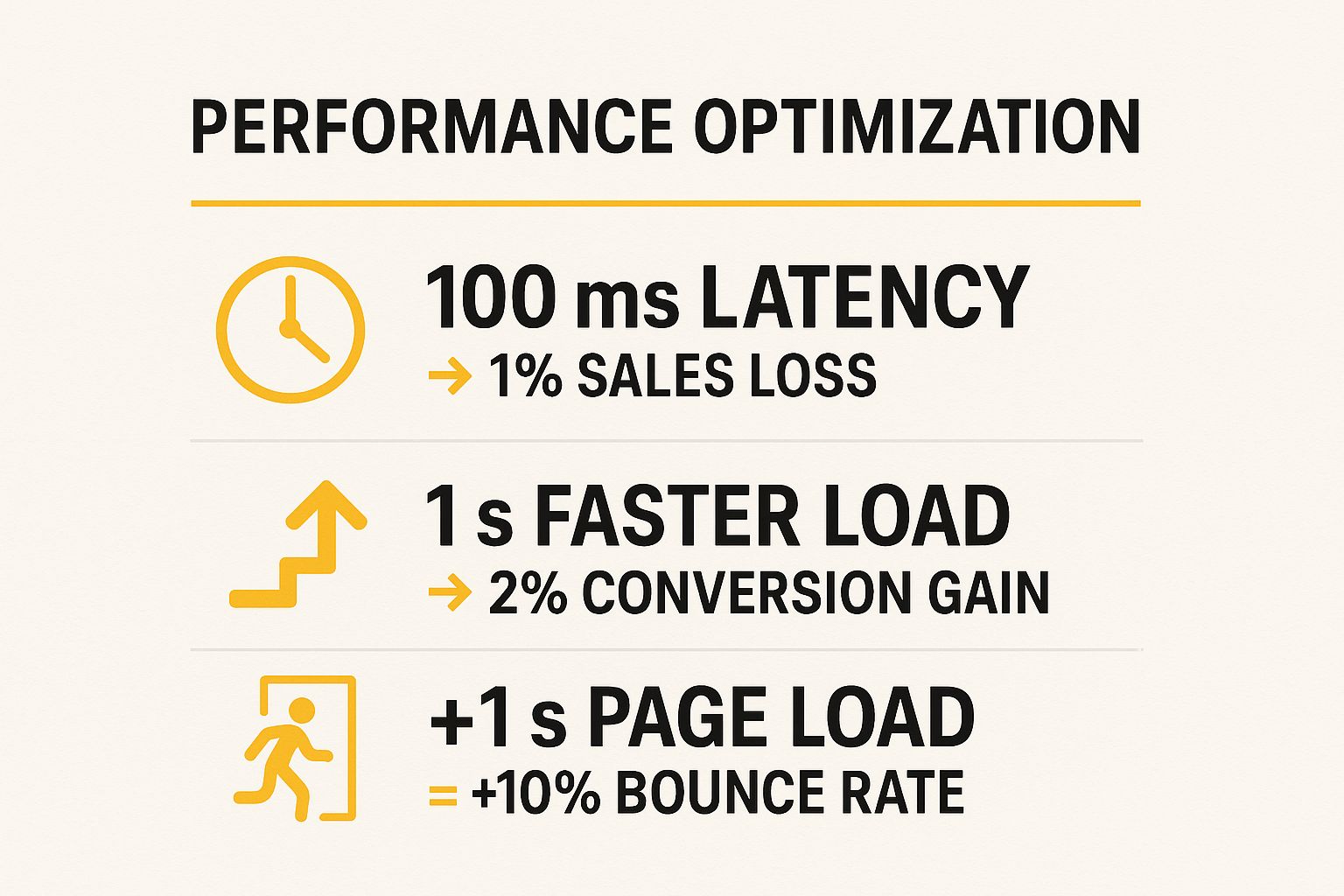
These statistics powerfully illustrate that even minuscule delays can cause significant sales loss, while small improvements can deliver substantial gains in conversions and user retention.
How to Implement Performance Optimization
A proactive approach to speed involves a mix of tools, best practices, and consistent monitoring. A fast website is built through deliberate, recurring actions.
- Benchmark with Multiple Tools: Run weekly speed tests using a combination of tools like GTmetrix, Pingdom, and Google PageSpeed Insights. Each tool offers a slightly different perspective, giving you a comprehensive view of potential bottlenecks.
- Optimize Your Visuals: Before uploading any image, compress it using a tool like TinyPNG and serve it in a modern format like WebP. Implement lazy loading so that images and videos below the fold only load when a user scrolls to them.
- Streamline Code and Assets: Use plugins like Autoptimize or WP Rocket to minify CSS and JavaScript files, which removes unnecessary characters from the code. Also, enable GZIP compression on your server to reduce the size of files sent from your server to the browser.
- Leverage a Content Delivery Network (CDN): A CDN like Cloudflare or Bunny.net stores copies of your site's static assets (images, CSS, JS) on servers around the world. This drastically reduces load times for international visitors by serving content from a location geographically closer to them. Learn more about the critical role speed plays in your website's success.
4. Broken Links and 404 Error Monitoring
A user clicking a link only to land on a "404 Not Found" error page is one of the quickest ways to erode trust and lose a potential customer. Broken link monitoring is the proactive process of scanning your site to find and fix dead ends, ensuring every click leads users where they expect to go. This essential task in your website maintenance checklist protects both user experience and your hard-earned SEO rankings, as search engines penalize sites with excessive crawl errors.
For an e-commerce store, a broken link to a product page is a direct loss of revenue. For a service-based business, it could be a broken link on a high-traffic blog post that was supposed to drive leads to a contact form. Regularly checking for and fixing these issues maintains navigational integrity and ensures your site functions as a seamless, professional resource, not a digital dead end.
How to Implement Broken Link and 404 Monitoring
An effective monitoring strategy goes beyond simply finding broken links; it involves a systematic approach to fixing them and preventing future occurrences.
- Automate Regular Scans: Use tools like Screaming Frog, Ahrefs' Site Audit, or a WordPress plugin like Broken Link Checker to run automated scans. Schedule a comprehensive site-wide scan at least monthly, with more frequent checks on your most critical, high-traffic pages.
- Leverage Google Search Console: Actively monitor the "Pages" report (formerly Coverage report) in Google Search Console. This free tool will explicitly tell you which URLs Googlebot tried to crawl but couldn't find, highlighting 404 errors that are directly impacting your SEO.
- Prioritize Fixes by Impact: Don't just fix links chronologically. Start with broken links found on your most important pages, such as your homepage, primary service pages, and popular blog posts. Fixing these first yields the greatest immediate benefit to user experience.
- Implement Smart Redirects: When you find a broken link to a page that has been moved or deleted, implement a 301 redirect. This permanently forwards users and search engine authority to the new, relevant URL, preserving link equity and preventing a negative user experience. Create a custom, helpful 404 page for any links that cannot be redirected.
5. Content Review and Updates
Just as you wouldn't leave outdated products on a physical store shelf, your website's content requires regular attention to remain valuable. Content review and updates involve systematically auditing your site's pages for accuracy, relevance, and performance. This process ensures that product details are correct, blog posts contain current information, and brand messaging is consistent, preventing your site from becoming a digital relic. A comprehensive content strategy is a cornerstone of any effective website maintenance checklist.
Stale content can actively harm your brand. For instance, a software company showcasing outdated screenshots confuses potential customers, while a medical site with old health advice loses credibility. HubSpot famously demonstrated the power of this practice by updating old blog posts, which resulted in a 106% increase in organic traffic to those pages. Regularly refreshing your content signals to both users and search engines that your site is a current, authoritative resource in your field.
How to Implement Content Review
A structured approach turns content review from a daunting task into a manageable, high-impact activity. This goes beyond fixing typos; it's about strategic enhancement.
- Create a Content Audit Spreadsheet: Your first step is to inventory your content. Create a spreadsheet listing key pages (especially blog posts and service pages), tracking metrics like traffic, last update date, and keyword rankings. This identifies which assets to prioritize.
- Prioritize High-Impact Pages: Focus your initial efforts on pages that already receive significant traffic or target important keywords. A small update to a popular blog post or a key service page can yield much faster results than overhauling a low-traffic article.
- Refresh and Relaunch: Go beyond simply adding a new sentence. Update statistics, replace old examples, add new internal links, and swap out dated screenshots or images. When a post is substantially revised, update the publication date to signal its freshness to search engines.
- Prune or Consolidate: Not all content is worth keeping. Identify thin, duplicate, or underperforming pages that offer little value. These can often be consolidated into a more comprehensive resource or removed and redirected to a relevant page to improve your site's overall quality score. For businesses targeting a specific area, keeping content fresh and relevant is a key part of a successful local business digital marketing strategy.
6. Database Optimization and Cleanup
Over time, your website's database can become bloated with unnecessary data, much like a computer's hard drive fills with temporary files. Database optimization is the critical process of cleaning and reorganizing this data to ensure your site runs efficiently. This involves removing things like post revisions, spam comments, and expired temporary data, which collectively slow down data retrieval and increase page load times. This is an essential part of any thorough website maintenance checklist.
For a WordPress site, every post revision you make is saved, potentially turning a single 50KB post into a 500KB burden on your database after ten edits. Similarly, an e-commerce store can accumulate thousands of rows of old abandoned cart data. This digital clutter forces the server to sift through more information to fulfill requests, directly impacting user experience and site speed. A clean, optimized database is a cornerstone of a high-performing website.
How to Implement Database Optimization
A strategic approach to database cleanup can significantly improve your site’s performance and reduce hosting storage costs. Here are the key steps to keep your database lean and fast.
- Backup Before You Begin: Before performing any database operations, always create a complete backup. This is a non-negotiable safety net that allows you to restore your site instantly if something goes wrong during the cleanup process.
- Limit Post Revisions: In WordPress, you can limit the number of revisions saved for each post. Add the line
define('WP_POST_REVISIONS', 5);to yourwp-config.phpfile to save only the last five versions, preventing indefinite database growth. - Use a Cleanup Plugin: Tools like WP-Optimize or Advanced Database Cleaner can automate the removal of spam comments, trashed posts, old post revisions, and expired transient options. Schedule these to run automatically on a monthly basis.
- Optimize Database Tables: Your database tables can become fragmented over time, similar to a hard drive. Use a tool (often included in cleanup plugins or your hosting control panel via phpMyAdmin) to "optimize tables," which defragments the data for faster access.
7. Security Scanning and Malware Detection
A crucial part of any website maintenance checklist is proactively hunting for threats before they cause damage. Security scanning involves using specialized tools to automatically examine your website's files, database, and traffic for vulnerabilities, malicious code, and suspicious activity. Think of it as a digital alarm system combined with a nightly security patrol, designed to detect backdoors, phishing kits, malware, and other security risks before they can compromise your data or harm your visitors.
The consequences of a security breach can be devastating. In 2018, British Airways was fined over $230 million after a website compromise led to the theft of customer data. For smaller businesses, the reputational damage and cleanup costs can be even more crippling. Regularly scanning for malware is not just a technical task; it's a fundamental part of protecting your business, your customers, and your online credibility.
How to Implement Security Scanning
A comprehensive security strategy requires multiple layers of defense and consistent monitoring. Here’s how to build a robust scanning routine for your WordPress site.
- Schedule Automated Daily Scans: Use a reputable security plugin like Wordfence or Sucuri to perform automated daily scans. These tools check core WordPress files, plugins, and themes against known malware signatures and can identify suspicious file changes or code injections.
- Install a Web Application Firewall (WAF): A WAF acts as a protective shield between your website and incoming traffic. It actively blocks malicious requests, brute-force login attempts, and known attack patterns before they can even reach your site, significantly reducing your risk.
- Monitor for Blacklisting: Regularly check your site's status on Google Safe Browsing and monitor Google Search Console for any security warnings. Being blacklisted can decimate your organic traffic and display frightening warnings to potential visitors.
- Harden User Access: Implement strong security practices for all admin accounts. This includes enforcing strong, unique passwords, enabling two-factor authentication (2FA), and limiting login attempts to prevent brute-force attacks. Never use the default "admin" username.
- Set Up Real-Time Alerts: Configure your security tools to send immediate notifications via email or Slack if a threat is detected. Prompt action is critical to containing a breach and minimizing damage.
8. Mobile Responsiveness Testing
In an era where mobile devices generate over half of all web traffic, ensuring your site is fully functional and visually appealing on a small screen is no longer optional. Mobile responsiveness testing is the process of verifying that your website's layout, content, and features adapt seamlessly to various devices, screen sizes, and orientations. This is a crucial component of any modern website maintenance checklist, as it directly impacts user experience, engagement, and search engine rankings.

Since Google fully implemented mobile-first indexing, the mobile version of your site is the primary one used for ranking and indexing. For an Austin-based restaurant, a non-responsive menu that forces users to pinch and zoom can lead to an immediate lost customer. Similarly, an e-commerce store with tiny, hard-to-tap "Add to Cart" buttons will see abandoned carts skyrocket. Regular testing ensures your digital storefront is as welcoming on a smartphone as it is on a desktop.
How to Implement Mobile Responsiveness Testing
Effective mobile testing is more than just shrinking your browser window; it requires a detailed, multi-faceted approach to catch potential issues before they affect your users.
- Use a Mix of Emulators and Real Devices: Start with browser-based tools like Chrome DevTools to quickly simulate different screen sizes (iPhone, Galaxy, iPad). However, always supplement this with testing on actual physical devices to check for real-world performance, touch accuracy, and OS-specific quirks.
- Focus on Touch Target Size: All interactive elements, like buttons, links, and form fields, must be easy to tap. Google recommends a minimum touch target size of 48×48 pixels to prevent user frustration and accidental clicks.
- Verify Form Functionality: Go through every form on your website, from contact forms to checkout fields. Ensure that the on-screen keyboard doesn't obstruct crucial fields and that input types (e.g.,
type="tel"for phone numbers) trigger the correct mobile keyboards. - Test Network Conditions: Use a tool like Chrome's network throttling feature to simulate slower connections (e.g., "Slow 3G"). This helps you understand how your site's load time and performance are perceived by users who aren't on high-speed Wi-Fi, which is a common scenario for mobile browsing.
9. SEO Health Monitoring and Optimization
A high-performing website is invisible if search engines can't find it. SEO health monitoring is the ongoing process of auditing and refining your site’s technical and content elements to maintain and improve search engine rankings. This crucial part of any website maintenance checklist ensures your site remains visible to potential customers actively searching for your services, preventing gradual traffic decay due to algorithm updates or technical glitches.
Just like a physical store needs good signage and a prime location, your website needs strong SEO to attract organic traffic. For a local service provider in Austin, for example, neglecting SEO is like having an unlisted phone number. Consistent monitoring ensures you're not just online but are actively competing for top positions in search results, which directly translates to more leads and sales without continuous ad spend.
How to Implement SEO Health Monitoring
Effective SEO maintenance is a proactive, not reactive, process. It involves regular checks and strategic adjustments to align with search engine best practices.
- Audit with Google Search Console: This free tool from Google is your command center for SEO health. Weekly, check for crawl errors, mobile usability issues, and manual actions. Pay close attention to the Core Web Vitals report to ensure your site meets Google's user experience standards.
- Track Keyword Rankings: Monitor your top 10-20 commercial keywords monthly. A sudden drop in rankings can be an early indicator of a larger issue, such as a new algorithm update or a competitor's successful campaign. Tools like SEMrush or Ahrefs can automate this tracking.
- Conduct Content and Technical Audits: Quarterly, audit your title tags, meta descriptions, and internal linking structure. Ensure your XML sitemap is current and submitted. This is also a good time to check for duplicate content and ensure you are implementing structured data (schema markup) for rich snippets. For a deeper dive, explore these technical SEO best practices to keep your site’s foundation solid.
- Review Your Backlink Profile: Regularly use a tool to monitor new and lost backlinks. Disavow any toxic or spammy links that could harm your site's authority. Building a clean, high-quality backlink profile is essential for long-term SEO success.
10. Uptime Monitoring and Server Health Checks
The most fundamental task in any website maintenance checklist is ensuring your site is actually online and accessible. Uptime monitoring is the process of using an external service to continuously "ping" your website, checking if it's responsive. If the service can't reach your site, it triggers an immediate alert, so you're the first to know about a problem, not your customers. This is your digital storefront's 24/7 security guard, ensuring the doors are always open for business.
For an e-commerce site, even minutes of downtime can translate into thousands of dollars in lost revenue. A 2018 outage cost Amazon an estimated $100 million in just 49 minutes. While your stakes might be different, the principle remains: availability builds trust and supports revenue. This daily check is non-negotiable for maintaining a professional, reliable online presence and is a core part of any comprehensive website maintenance checklist.
How to Implement Uptime Monitoring
Effective monitoring goes beyond a simple "is it up or down?" check. A robust strategy provides deeper insights into your site's health and performance.
- Geographic Monitoring: Use a service like UptimeRobot or Pingdom to check your site from multiple locations worldwide. This helps identify regional network issues or CDN problems that might not be visible from your own location.
- Track Response Times: Don't just monitor uptime; track server response time. A slow, sluggish website can be just as damaging as one that is completely down, leading to high bounce rates and poor user experience.
- Critical Page Checks: Monitor more than just your homepage. Set up checks for key user pathways, such as your main product pages, login portals, and, most importantly, the checkout process.
- Establish Alert Protocols: Configure multi-channel alerts (email, SMS, Slack) and set up escalation paths. If a primary contact doesn't acknowledge an alert within a set time, it should automatically notify the next person in line. This ensures critical issues are never missed.
Website Maintenance Checklist Comparison
| Item | Implementation Complexity 🔄 | Resource Requirements ⚡ | Expected Outcomes 📊 | Ideal Use Cases 💡 | Key Advantages ⭐ |
|---|---|---|---|---|---|
| Security Updates and Patches | Moderate – requires testing and occasional developer help | Medium – tools, staging environment, periodic manual checks | Prevents breaches, maintains compliance, enhances trust | Websites exposed to regular threats and with many plugins | Reduces downtime risk, protects data, performance improvements |
| Backup and Recovery Management | Moderate – setup automated backups and test recovery processes | High – storage space and backup services costs | Quick recovery from data loss, minimizes downtime | Critical data websites, e-commerce, active content sites | Ensures data safety, allows rollback, reduces downtime |
| Performance Optimization & Speed Testing | High – technical expertise needed for setup and ongoing monitoring | Medium to High – paid tools, CDN, technical resources | Faster load times, improved UX, SEO boost, higher conversions | High traffic, sales-driven, SEO-focused websites | Enhances speed and engagement, reduces server load |
| Broken Links and 404 Error Monitoring | Low to Moderate – mostly automated scanning and manual fixes | Low – automated tools and scheduled scans | Improved UX, better SEO, maintained link equity | Content-heavy sites, e-commerce, news sites | Prevents SEO damage, enhances navigation and credibility |
| Content Review and Updates | Moderate to High – requires expertise and coordination | Medium – human resources and SEO tools | Maintains accuracy, relevance, SEO ranking improvement | Blogs, informational sites, business websites | Builds trust, increases engagement, identifies content gaps |
| Database Optimization and Cleanup | Moderate – technical knowledge or plugins needed | Low to Medium – plugins or manual effort | Faster queries, reduced storage, better server efficiency | High content volume, e-commerce, membership sites | Improves speed, reduces costs, prevents corruption |
| Security Scanning and Malware Detection | Moderate to High – automated scans with expert analysis | Medium to High – premium security tools | Early threat detection, prevents blacklisting, protects reputation | All websites needing strong security | Proactive protection, reduces remediation costs |
| Mobile Responsiveness Testing | Moderate – testing on devices and browsers, fixing issues | Low to Medium – device access, tools, developer time | Enhanced mobile UX, better SEO via mobile-first indexing | Mobile traffic-heavy sites, e-commerce, services | Increases conversions, reduces bounce, improves accessibility |
| SEO Health Monitoring and Optimization | Moderate – requires ongoing audits and adjustments | Medium – SEO tools and expertise | Improved organic traffic, better rankings, sustainable growth | Business and content sites focused on search visibility | Drives qualified traffic, early issue detection |
| Uptime Monitoring and Server Health Checks | Low – mostly automated monitoring and alerting | Low to Medium – monitoring services subscription | Reduced downtime, faster response, better user trust | Mission-critical, high-availability websites | Immediate alerts, revenue protection, SLA compliance |
Turn Your Checklist into a Growth Engine with Expert Help
Navigating the complexities of website maintenance is no small feat. We've journeyed through a comprehensive website maintenance checklist, breaking down the critical daily, weekly, monthly, and quarterly tasks that form the foundation of a healthy, high-performing WordPress site. From the immediate necessity of security updates and daily backups to the long-term strategic value of SEO audits and content refreshes, each item plays a vital role in protecting your digital asset.
This is more than just a list of chores; it's a blueprint for digital resilience and growth. Consistently monitoring for broken links, optimizing your database, and testing for mobile responsiveness ensures a seamless user experience. Meanwhile, vigilant security scanning and performance testing act as your first line of defense against threats and user frustration, which are two of the fastest ways to lose potential customers.
From Defensive Chore to Proactive Strategy
The core takeaway is that effective website maintenance transcends simple prevention. It's not just about stopping bad things from happening. It’s about proactively creating an environment where good things, like higher search rankings and increased conversions, are more likely to happen. A fast, secure, and error-free website builds trust with both users and search engines like Google.
Think of it this way:
- Performance Optimization isn't just about speed; it's about reducing bounce rates and keeping users engaged long enough to convert.
- SEO Health Monitoring isn't just about keywords; it's about ensuring your valuable content is discoverable by your target audience in Austin and beyond.
- Content Reviews aren't just about fixing typos; they're about reaffirming your authority and keeping your brand relevant.
By diligently applying this website maintenance checklist, you are actively investing in your site’s ability to function as your most effective marketing tool and 24/7 salesperson.
Actionable Next Steps: Your Path Forward
Mastering these tasks transforms your website from a static online brochure into a dynamic engine for business growth. The challenge, however, often lies in execution. For many small and medium-sized businesses, the time and technical expertise required to manage this checklist consistently can feel overwhelming. The key is to not let this detailed plan become a source of stress but rather a tool for empowerment.
Your immediate next step should be to audit your current process. Where are the gaps?
- Assign Ownership: Determine who on your team is responsible for each category of tasks (daily, weekly, etc.). If the answer is "no one" for any category, that's your first priority.
- Automate What You Can: Use trusted plugins or services for automated backups, uptime monitoring, and security scans to create a safety net.
- Schedule Everything: Block out time on your calendar for the manual tasks, such as content reviews, performance tests, and broken link checks. Treat these appointments with the same importance as a client meeting.
Ultimately, a well-maintained website is a reflection of a well-run business. It signals to your customers that you care about their experience and are committed to professionalism. By embracing the principles within this website maintenance checklist, you are not just ticking boxes; you are building a stronger, more reliable foundation for your company's digital future and ensuring you get the maximum return on your online investment.
At Gidds Media, we specialize in transforming this comprehensive website maintenance checklist from a demanding to-do list into a fully managed growth strategy. We handle every technical detail, from security and speed to ongoing SEO, so you can focus on running your business with complete peace of mind. Visit Gidds Media to get a free SEO audit and discover how our expert WordPress management can unlock your site's true potential.