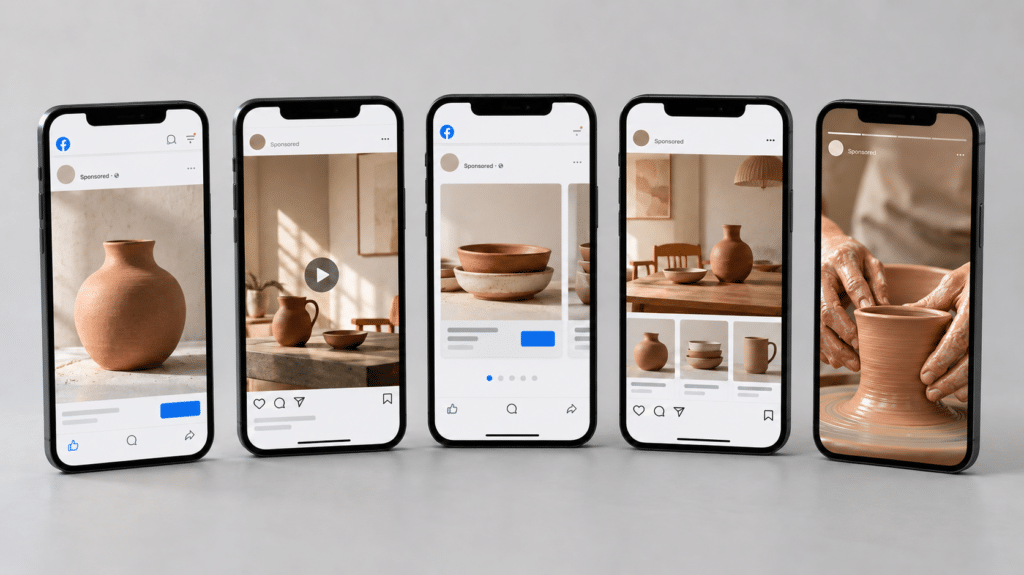
Meta runs the ads you see across Facebook, Instagram and more, and it gives businesses several ways to show up there. If you’re trying to understand the types of Meta ads, there are five main ones: image ads, video ads, carousel ads, collection ads, and Stories and Reels ads.
The format you pick shapes who sees your ad, how people react to it, and how much work it takes to make. This guide explains each one in plain language, including when to use it, what it costs and how to get started.
Meta offers a few more formats beyond these five. We’ll cover those too.
Where Do Meta Ads Appear?
Your social media ads can appear on Facebook, Instagram, and other Meta apps. According to Meta, 3.60 billion people used its apps daily in June 2026, up 3% from the previous year.
Meta is also expanding to Threads. Social Media Today reported that brands without a Threads account can extend their Facebook or Instagram campaigns there.
You can usually choose where your ad runs when you set it up. The format you pick affects which spots suit it best.
The 5 Types of Meta Ads Explained
1. Image Ads
An image ad is the simplest option. It’s one picture, a short message, and a button such as “Shop Now” or “Learn More.”
Best for: a clear offer, an announcement, or a quick first test.
Tips:
- Stick to one message per image.
- Use a sharp, well-lit photo.
- Keep words on the image to a minimum.
Watch out for: a single image can’t show many products or explain how something works.
2. Video Ads
A video ad plays one video, with text and a button. Meta’s developer guide notes that the button shows as part of the post, and floats over the video when someone watches full-screen on a phone.
Best for: showing a product in use, sharing a customer story, or explaining something that’s hard to put in a photo.
Tips:
- Put the most interesting moment in the first few seconds.
- Add captions so the message still works with the sound off.
- Keep it short and focused on one idea.
Watch out for: video takes more effort to make than a photo. A phone recording with good lighting is often enough to start.
3. Carousel Ads
A carousel ad lets people swipe through several cards inside one ad. Each card can show a different image or video.
Meta’s developer guide says you can use 2 to 10 cards, and it recommends at least three for the best results. For images, it suggests a square shape (1:1) at least 458 x 458 pixels.
Best for: showing several products, walking through steps, or telling a story in stages.
Tips:
- Put your strongest card first.
- Keep the look of every card consistent.
- Make each card useful by itself, since not everyone will swipe to the end.
Watch out for: the same Meta guide lists Facebook Stories as a spot where carousel ads aren’t supported. Check your options in Ads Manager’s preview before you build.
4. Collection Ads
A collection ad shows one main image or video, with product photos below it. When someone taps, it opens a full-screen page inside the app. Meta’s developer documentation explains that the ad appears in Feed and expands into a full-screen experience, and that it can be built around an image or a video.
Think of it as a small storefront that opens inside Facebook or Instagram.
Best for: online shops with several products people like to browse.
Tips:
- Choose a cover image that makes people curious.
- Keep your product photos clean and consistent.
- Make sure your product details and prices are up to date.
Watch out for: collection ads work best when you already have good product photos and a tidy product list.
5. Stories and Reels Ads
Stories ads are full-screen ads that appear between Stories from accounts people follow. Reels ads appear between short videos in the Reels feed.
Both are built for tall, vertical viewing. Search Engine Land explains that a 9:16 vertical video fills the whole Stories space, while a 4:5 video gives you the most room in Feed and Reels.
Meta has also been expanding “trending” Reels ads, which place your ad beside popular Reels content. Social Media Today reported in September 2025 that Meta’s early tests showed a 20% boost in unaided awareness, meaning people remembered the brand without being prompted. Treat that as Meta’s own early result, not a promise.
Best for: reaching people who are already scrolling quickly on their phones.
Tips:
- Design for a vertical, full-screen view.
- Keep text and logos inside the “safe zones,” away from the top and bottom edges where profile icons and buttons can cover them.
- Get to the point fast.
Watch out for: these spots move quickly. If the first second doesn’t grab attention, people swipe past.
Other Meta Ad Formats Worth Knowing
Beyond the five above, Meta offers several more:
- Lead ads: let people sign up without leaving Facebook or Instagram. Meta’s lead ads guide says the form is mobile-friendly and pre-fills with details people have already shared with Facebook. Leads belong to your Facebook Page and can be downloaded from Leads Center in Meta Business Suite. These suit quotes, bookings and sign-ups.
- Catalog ads: Meta describes these as a way to promote relevant items from your whole catalog. They pull images, descriptions and prices from a product feed you create.
Coursera’s roundup of Meta formats also lists these:
- Instant Experience ads: open full-screen on a phone and can mix images, videos, carousel cards, text and buttons.
- Slideshow ads: use three to ten images or videos to create a video-style story.
- Messenger ads: start a conversation between your business and a potential customer.
Meta updates its formats often. Social Media Today reported on Meta publishing its own guide to Facebook ad formats and noted that tweaks roll out regularly. Always check the ad preview in Meta’s Ads Manager before you build.
Which Type of Meta Ad Should You Choose?
Start with your goal. Meta asks you to pick one before anything else (the full list is in the setup steps below).
| Your goal | A good place to start | Why it fits |
|---|---|---|
| Get a simple offer noticed | Image ad | Quick to make and easy to test |
| Explain or show something | Video ad | Shows instead of tells |
| Show several products or steps | Carousel ad | Many ideas in one ad |
| Sell from a product range | Collection ad | People can browse inside the app |
| Reach people on their phones | Stories and Reels ads | Takes over the whole screen |
| Collect enquiries or bookings | Lead ad | The form stays inside Facebook or Instagram |
| Show items from a large catalog | Catalog ad | Pulls products from your feed automatically |
A simple rule: use the simplest format that gets your message across. If an image says it clearly, you don’t need a video.
How Much Do Meta Ads Cost?
There’s no fixed price for each type of ad. Cost depends on your audience, your goal and how many other advertisers want the same people.
Competition is real. In Meta’s second quarter 2026 results, ad impressions rose 14% year over year while the average price per ad rose 12%. That’s an average across all of Meta, not what you’ll pay. It does show why starting small and testing makes sense.
According to Coursera’s summary of Meta’s setup guide, the ad format, the day of the week and the time your ad goes live can all affect price. Spending can start at $1 a day, and Meta recommends starting with at least $5 a day.
You control the budget in two ways:
- Daily budget: the amount you spend each day.
- Lifetime budget: the total you’re willing to spend over the whole campaign.
You can change the amount or pause the ad at any time.
How Long Does It Take to See Results?
Most ads need some time before the numbers mean anything. Coursera says ads usually take three to seven days to settle in, and one to two weeks to perform at their best.
During this early period, Meta’s system is testing your ad with different people and places. It usually ends once the ad has gathered roughly 50 results for your chosen goal in a week.
Meta also recommends keeping your budget steady for at least seven days so the numbers are reliable. Making big changes every day can slow that learning down.
How to Set Up Your First Meta Ad
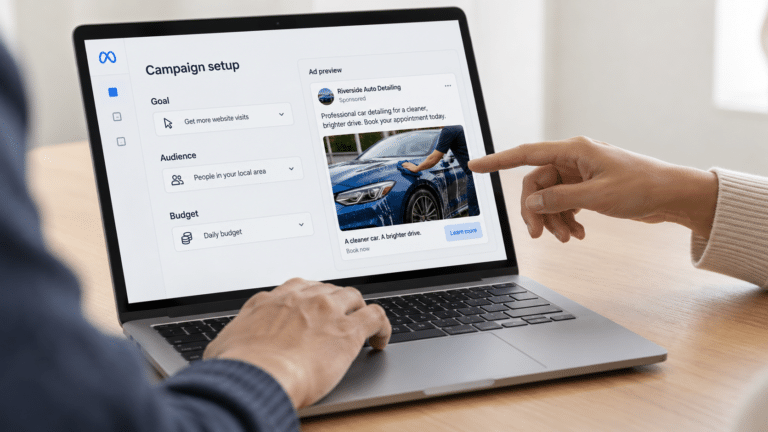
You need a Facebook Page or an Instagram account for your business. You don’t need a website. Meta’s own step-by-step process, as summarized by Coursera, looks like this:
- Choose your goal. Options include awareness, traffic, engagement, leads, app promotion, or sales.
- Choose your audience. Decide who should see it.
- Choose where it runs. Facebook, Instagram, or other places.
- Set your budget. Daily or lifetime.
- Pick your ad format. Image, video, carousel and so on.
- Preview and publish. Check how it looks before it goes live.
- Watch and adjust. Check results in Ads Manager and make changes.
Common Mistakes to Avoid
- Picking a format before a goal. Decide what you want people to do first, then choose the format that helps them do it.
- Changing too much too soon. Give each ad a few days before you judge it.
- Squeezing in too many ideas. One ad, one message.
- Ignoring what happens after the click. The page people land on should match the ad.
- Never refreshing your ads. When results slip, try fresh images or videos and check how often the same people see your ad.
- Skipping tests. If few people click, try a new headline or main text. You can also compare two versions of an ad, with half your audience seeing each.
When to Bring in Help
Many businesses can start with a single image or video ad on their own. Help becomes useful when you want to test several formats, manage a larger budget, or free up time to run your business.
If that sounds like you, take a look at the Meta ads service page to see how the team works. You can also read about how Meta ad services work behind the scenes before you decide.
Ready to talk it through? You can book a consultation online or get in touch with the team with your questions. You can also learn more about Gidds Media on the main site.
Frequently Asked Questions
How many kinds of ads does Meta offer?
Meta offers more than five. This guide covers the five most common ones (image, video, carousel, collection, and Stories and Reels), plus other formats such as lead ads, catalog ads, slideshow ads and Messenger ads.
Are Facebook ads and Instagram ads different?
They’re built in the same place, Meta’s Ads Manager. You choose the format first, then choose where it runs, which can include Facebook, Instagram and other spots.
Which Meta ad type is best for beginners?
Image and video ads are the easiest to start with. Both are simple to set up, and you can test them quickly without much production work.
Do I need a website to run Meta ads?
No. You do need a Facebook Page or an Instagram account for your business, as covered in the setup steps above.
Can I run more than one type of ad at the same time?
Yes. Many advertisers test a few formats side by side to see which one gets the best response. Change one thing at a time so you can tell what made the difference.
Final Thoughts
The five main types of Meta ads give you plenty of ways to reach people: images for simple messages, video for showing and telling, carousels for variety, collections for shopping, and Stories and Reels for full-screen attention. Start with your goal, pick the simplest format that fits, and test from there.