If you’re searching for how to run Meta ads, you likely want a plain answer: what to set up, what to click, what to spend, and whether you need help. Meta ads are the paid ads that show up on Facebook, Instagram, and Messenger.
You can run them yourself. Many small businesses do. But the work is more than pressing “boost,” and knowing when to bring in an agency can save you money and months of trial and error.
Key Takeaways
Here is the whole process in six steps:
- Set up your accounts. You need a Facebook Page, a business account, an ad account, and a payment method.
- Add tracking. Install Meta’s tracking tools so Meta can see who visits your site and who buys or enquires.
- Pick one goal. Choose what you want the campaign to achieve, such as sales or enquiries.
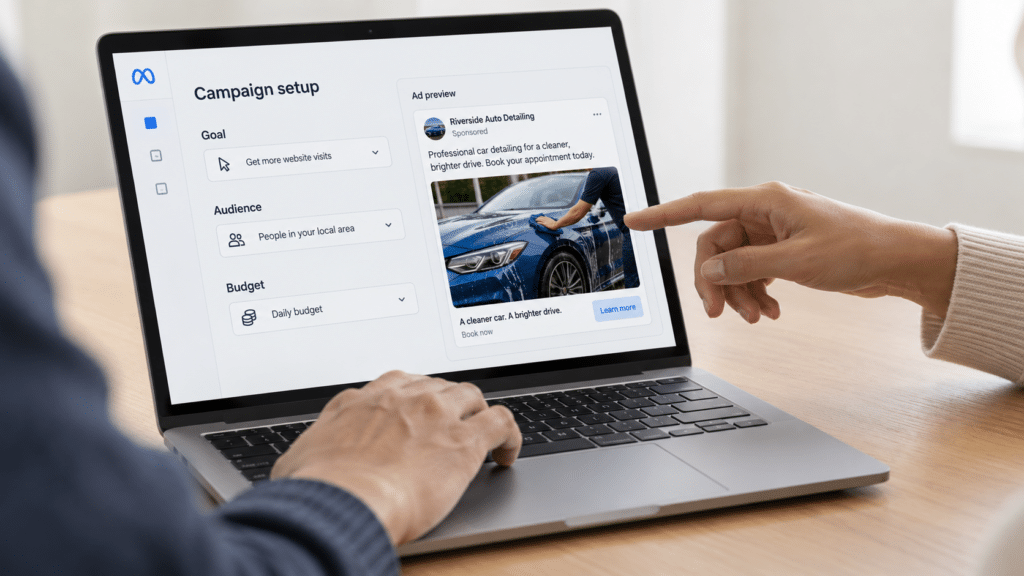
- Build the campaign. Choose your audience, budget, and placements, then create your ad.
- Submit for review. Meta checks every ad before it runs.
- Watch, then adjust. Give the ads time to settle before you change much.
Hire an agency when ads are eating your time, results are flat after a few honest tries, or your monthly ad spend is large enough that a small mistake gets expensive. The sections below cover each step and the signs it’s time for help.
How to Run Meta Ads: Step by Step
Step 1: Set Up Your Accounts
Start with a Facebook Page for your business. Then create a business account in Meta’s business tools and add an ad account to it.
Add a payment method last. Keep your login details in the hands of the business owner, not only a freelancer or employee, so you never lose access to your own ads.
Step 2: Set Up Tracking So Meta Can See Your Results
Tracking is the step most beginners skip, and it causes the most trouble later. Without it, Meta can’t tell which ads lead to sales or enquiries, so it can’t improve delivery.
There are two tools to know about:
- Meta Pixel: a small piece of code on your website that records visits and actions, like a purchase or form submission.
- Conversions API: a second route that sends the same results from your website’s server to Meta.
Meta’s own developer guidance says to use the Conversions API alongside the Pixel and share the same events through both. The reason is that the Pixel can miss events because of connection problems or page loading errors, and the Conversions API can fill those gaps.
Meta also has a Help Center article, About Conversions API, that explains the basics in plain terms. If your website was built by someone else, ask them to help with this step.
Step 3: Choose One Goal for Your Campaign
Meta asks you to choose an objective first. This tells Meta what result you want. The six choices are:
- Awareness: get your name in front of more people
- Traffic: send people to your website
- Engagement: get likes, comments, messages, or video views
- Leads: collect enquiries or form sign-ups
- App promotion: get people to install your app
- Sales: get purchases
Pick the one closest to the result that pays your bills. A common mistake is choosing “Traffic” because clicks feel like progress, when the real goal is sales or enquiries.
Step 4: Understand How a Campaign Is Organised
Every Meta campaign has three layers. According to Meta’s Marketing API documentation, a campaign is the top level and should represent a single objective.
- Campaign: the goal.
- Ad set: who sees your ads, where they appear, your budget, and the schedule.
- Ad: the image or video, the text, and the button people see.
Meta’s documentation also notes that you can create multiple ads in each ad set to see how different images, text, or placements perform. Starting with a few different ads in one ad set is a sound way to learn what your audience responds to.
Step 5: Choose Your Audience and Placements
Tell Meta where your customers live, their age range, and any interests that fit your business. Don’t make the audience so narrow that few people qualify.
For placements, which means where your ads appear, beginners can usually leave Meta’s automatic options on. You can narrow them later once you see where your results come from.
Step 6: Set Your Budget
Meta lets you set either a daily budget or a lifetime budget for a set period. Meta’s bidding documentation explains how budgets and bids work with its ad auction, including how spending is paced over time.
Here is a simple way to think about it:
- Daily budget: an average amount per day. Good for ads that run continuously.
- Lifetime budget: a total for a set period. Good for a sale or event with fixed dates.
Start with an amount you can afford to lose while you learn. Don’t split a small budget across many ad sets, because each one then gets too little to learn from.
Step 7: Create the Ad Itself
Your ad is where most results are won or lost. Keep it simple:
- Lead with one clear message, not three.
- Use a bright, real image or a short video that works on a phone.
- Say what you want people to do, such as “Book a free quote.”
- Send people to a page that matches the ad’s promise.
If the ad promises a discount and the page doesn’t mention it, people leave.
Step 8: Submit Your Ads for Review
Before an ad runs, Meta checks it against its rules. According to Meta’s Advertising Standards, the review starts automatically and is typically completed within 24 hours, though it can take longer.
If an ad breaks the rules, it is rejected. Meta says the business account or its assets may also be restricted when violations are found, so read the rules before you publish, especially if you sell health, finance, or other sensitive products.
Step 9: Watch Results and Be Patient With Changes
Once your ads run, resist the urge to tweak them every few hours. Meta’s system needs time and results to learn who responds to your ads. This early period is called the learning phase.
Meta’s developer documentation states that significant edits cause an ad set to re-enter the learning phase. It also describes a status for ad sets that aren’t generating enough results to exit it.
In practice, that means big changes to the audience, budget, or ads can reset progress. Our advice is to give a new campaign at least a couple of weeks of steady running before you judge it, unless something is clearly broken.
How Much Do Meta Ads Cost?
There is no fixed price. Meta sells ad space through an auction, so what you pay depends on your goal, your audience, how many other businesses want the same people, and how well your ad performs.
That’s why two businesses with the same budget can get very different results. You set the limit on what you spend. Meta’s bidding documentation covers the billing options, including paying per impression, per click, or per action.
Remember there are two separate costs if you hire help:
- Ad spend: the money paid to Meta to show your ads.
- Management fee: what an agency charges for the work.
How Long Do Meta Ads Take to Work?
Expect a testing period, not instant sales. Ads need to pass review, gather results, and then be improved based on what you learn.
A realistic plan is to treat the first few weeks as learning time. Judge progress by the cost of each enquiry or sale, not by likes or views.
Common Mistakes That Waste Ad Budget
- Running ads with no tracking installed
- Choosing the wrong goal for the campaign
- Making big edits during the first days
- Spreading a small budget across too many audiences
- Using one ad only, so there’s nothing to compare
- Sending people to a slow or confusing web page
- Ignoring Meta’s advertising rules until an ad is rejected
Benefits and Risks of Running Meta Ads Yourself
Benefits
- You keep full control and learn your customers first-hand.
- You pay no management fee.
- You can start small and adjust quickly.
Risks
- It takes more time than most owners expect.
- Small setup mistakes can quietly burn budget.
- Rejected ads or restricted accounts can stop your sales.
- Poor tracking leaves you guessing what works.
When to Hire a Meta Ads Agency
Doing it yourself is a good start. But there comes a point where expert help pays for itself. Consider hiring an agency when:
- You’re short on time. Ads need regular attention, and you’d rather run your business.
- Results have stalled. You’ve tried new ads and audiences and nothing improves.
- Your spend is growing. The bigger the budget, the costlier each mistake.
- You need better tracking. Setting up the Pixel and Conversions API properly can be technical.
- You want fresh creative. Ads need new images, videos, and messages to stay effective.
- You’re launching something new. A new product, location, or offer deserves a careful plan.
DIY vs Agency at a Glance
| Doing it yourself | Hiring an agency | |
|---|---|---|
| Cost | Ad spend only | Ad spend plus a management fee |
| Time | Your time, often a lot | Mostly handled for you |
| Skill needed | You learn as you go | Experience from many accounts |
| Speed of learning | Slower, through trial and error | Faster, with tested approaches |
| Control | Full, hands-on | Shared; depends on the agency |
| Best for | Small budgets, learning stage | Growing budgets, limited time |
What a Meta Ads Agency Does for You
A good agency covers the whole job, not only the setup. Typically that includes:
- Planning the goal and budget with you
- Setting up accounts and tracking
- Writing and designing the ads
- Building and managing campaigns
- Testing new ads and audiences
- Sending clear reports in plain language
If you’d like a closer look at the range of work involved, this overview of what agencies handle on a Meta campaign walks through it. You can also see how our Meta ads management service works in practice.
How Much Does a Meta Ads Agency Cost?
Fees vary widely by agency, the size of your account, and the work included. We won’t quote a number here because any figure would be a guess without knowing your situation.
You’ll usually see one of these pricing models:
- Monthly retainer: a set fee each month.
- Percentage of ad spend: the fee grows as your budget grows.
- One-time setup fee: often paired with a monthly fee.
- Performance-based fee: tied to agreed results. Ask exactly how “results” are defined.
Always confirm that your ad spend goes straight to Meta from your own payment method and that you own the ad account.
How to Choose the Right Agency
Look for an agency that explains things clearly and doesn’t hide behind jargon. Ask these questions before you sign:
- Will I own my ad account and my data?
- How do you set up tracking?
- How often will we talk, and what will your reports show?
- What happens if results don’t improve?
- Is there a long contract, and how do I leave?
Be cautious of anyone who guarantees sales or can’t explain what they’ll do each month. For a fuller checklist, read a practical way to compare marketing agencies before you decide.
Frequently Asked Questions
Can a beginner run Meta ads?
Yes. Start with a small budget, one clear goal, and working tracking. Expect a learning curve, and avoid making big changes in the first days.
Do I need a website to advertise on Meta?
Not always. You can send people to a Facebook or Instagram profile or to a messaging chat. But a website with tracking gives Meta much better information to work with.
What is the best budget to start with?
There is no single right amount. Start with a sum you can comfortably spend while you test, and judge it by the cost of each enquiry or sale.
Why was my ad rejected?
Meta reviews every ad against its Advertising Standards. Check the reason shown in your account, fix the ad or the page it links to, and submit it again.
Is an agency worth it for a small business?
It can be, if your time is tight or your results have stalled. If your budget is very small, you may do better learning the basics first and bringing in help as you grow.
Ready for Help With Your Meta Ads?
If you’d rather hand the work to a team that handles it daily, Gidds Media can help. You can book a consultation to talk through your goals, or contact us with questions first.