To really boost your website's conversions, you have to start with a clear baseline. This means figuring out your current conversion rate, understanding what that number actually means for your specific industry, and then setting some smart, realistic goals for where you want to go.
Setting a Realistic Conversion Rate Benchmark
Before you can start tweaking and testing, you need to know your starting point. Chasing a "good" conversion rate without any context is like starting a road trip without knowing where you are on the map. You might be moving, but you have no idea if you're getting any closer to your destination. Setting a realistic benchmark grounds all your efforts in reality.
A classic mistake is grabbing a generic industry average and treating it like gospel. The truth is, conversion rates are wildly different from one sector to another. A brand selling a $20 skincare product is naturally going to have a much higher conversion rate than a company trying to sell a $5,000 B2B software package. The sales cycles, price points, and what customers need to consider are worlds apart.
Find Your Starting Line in Google Analytics
First things first, you need to find your current overall conversion rate. Google Analytics is the most direct place to get this data. If you already have conversion goals set up—like form submissions, newsletter sign-ups, or actual sales—the platform will calculate this for you automatically.
Here’s a glimpse of the dashboard where you can start digging into user behavior and conversion events.
This high-level view gives you a quick pulse on your site's performance, helping you see which channels are actually driving traffic and, more importantly, conversions.
Once you have this number, don't panic if it seems low. This is just your baseline—the number you're going to work to improve. Think of it as the foundation for your entire optimization strategy. For new businesses, understanding these core metrics is a vital piece of a strong digital marketing plan right from the start. You can learn more in our guide on building a startup digital marketing strategy from the ground up.
Understand Industry Nuances
Okay, now that you have your number, it's time for some context. Globally, the average e-commerce conversion rate as of 2025 hovers somewhere between 2% and 4%. But that's a massive generalization.
To get a clearer picture, let's look at how much this can vary by industry.
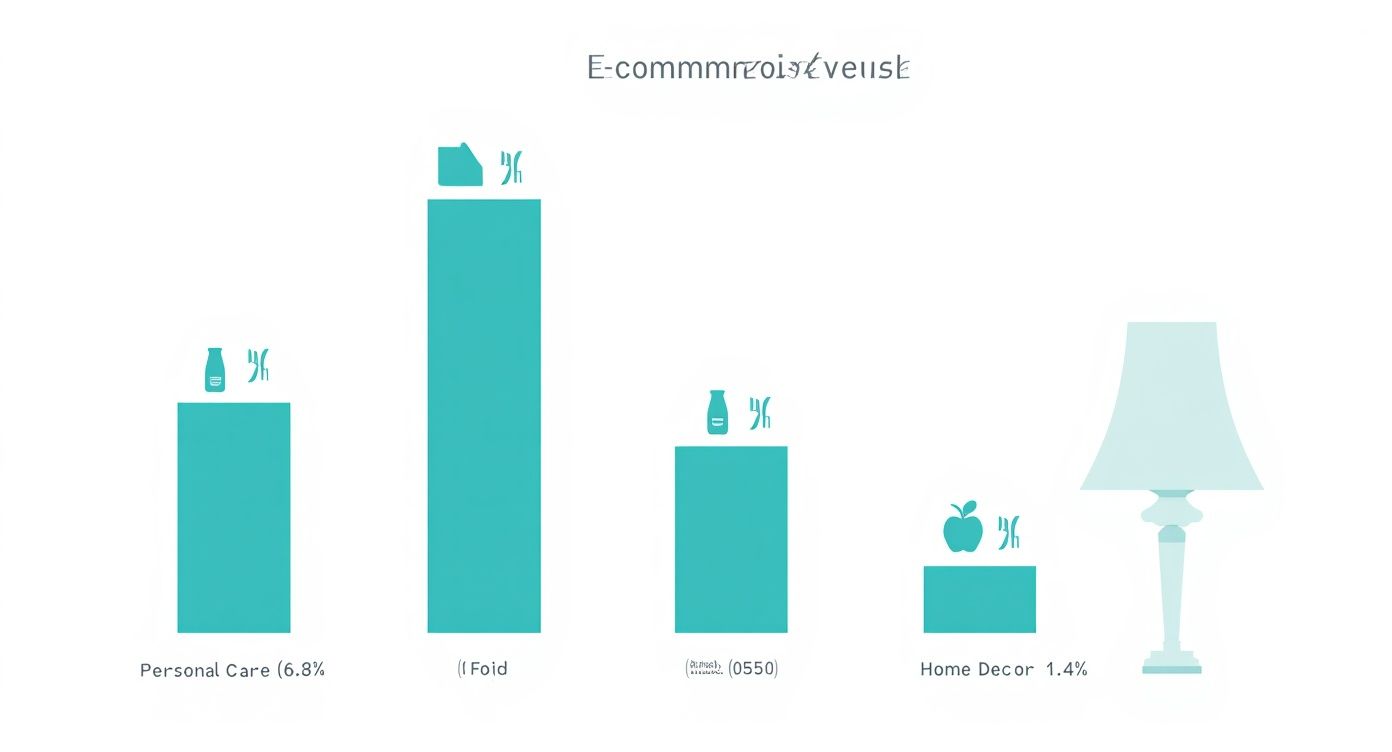
Average E-commerce Conversion Rates by Industry
This table illustrates the significant variation in average conversion rates across different e-commerce sectors, helping you benchmark your performance accurately.
| Industry | Average Conversion Rate |
|---|---|
| Personal Care & Beauty | 6.8% |
| Food & Beverage | 4.9% |
| Fashion & Apparel | 2.5% |
| Home Decor & Furnishings | 1.4% |
| Electronics & Appliances | 1.2% |
As you can see, the gap is huge. Lower-cost, high-demand items in personal care convert at a much higher rate than bigger, more considered purchases like home decor. This is why comparing your numbers to the right industry benchmark is so critical.
A "good" conversion rate isn't some universal number. It's a rate that's consistently improving month-over-month, based on your own historical data and a realistic view of your industry.
Pinpoint Your Biggest Opportunities
With your baseline established and some industry context in hand, you can start digging deeper to find the biggest opportunities for growth. Instead of getting hung up on your site-wide conversion rate, segment your data to uncover specific weak spots.
Here are a few places to start looking:
- By Device: Is your mobile conversion rate tanking compared to desktop? That's a huge red flag pointing to a clunky mobile user experience that needs immediate attention.
- By Traffic Source: Do visitors from organic search convert way better than those from social media? This could mean your social campaigns are targeting the wrong crowd or setting the wrong expectations with their messaging.
- By Landing Page: Are certain pages getting tons of traffic but almost no conversions? These "leaky" pages are the perfect candidates for A/B testing and optimization.
Analyzing these segments transforms a vague goal like "increase conversions" into a specific, actionable mission, like "improve the mobile checkout flow to lift our mobile conversion rate by 0.5%." This foundational work ensures every change you make is strategic, targeted, and measurable.
Turn Your Site Speed from a Glitch into a Growth Engine
Every single element on your website has a job to do, but nothing works harder than its loading speed. In that silent negotiation between a user clicking a link and your page appearing, every millisecond is a dealbreaker. A slow site isn't just a minor annoyance; it’s a direct roadblock to sales and the number one reason people bail before they even see what you're selling.
Think of your website’s speed as the first handshake in a business meeting. A fast, snappy load time makes an instant impression of professionalism and competence. On the flip side, a sluggish page just feels sloppy and untrustworthy, chipping away at a visitor’s confidence before they’ve even had a chance to engage.
This isn't just a gut feeling—it's backed by some serious data. Studies have shown that a website loading in one second can snag conversion rates up to five times higher than a site that takes a painful 10 seconds. Even small improvements make a huge difference. For example, sites in the one-to-two-second range often see conversions triple compared to those taking five seconds. You can see more stats on how speed crushes it in this detailed analysis.
Find the Bottlenecks: How to Audit Your Site's Speed
Before you can start fixing things, you need to know exactly what’s broken. Guesswork won't get you anywhere. Your first move should be to run a performance audit using some powerful (and free) tools that pinpoint precisely where the slowdowns are happening.
Google’s PageSpeed Insights is the industry gold standard. Just plug in your URL, and it spits out a detailed report with a performance score for both mobile and desktop. It’ll call out specific issues like bloated images, slow server response times, and code that’s getting in the way of a fast load.
But don't just fixate on the top-line score. The real gold is in the "Opportunities" section. It gives you an actionable checklist of what to fix and even estimates how much time you’ll save with each tweak. This turns a vague goal like "make the site faster" into a concrete, data-driven game plan.
High-Impact Fixes for Quick Wins
Once you’ve identified the culprits, it’s time to roll up your sleeves. You don’t need to be a coding genius to see a major improvement. Many of the most effective speed boosts are surprisingly straightforward and can be handled with simple tools or plugins. Getting these fundamentals right is a key part of any real optimization strategy, and we dive way deeper into the mechanics in our complete guide to technical SEO best practices.
Here are three areas to tackle first for the biggest bang for your buck:
-
Smart Image Compression: Unoptimized images are almost always the biggest speed hogs. That beautiful, high-resolution photo might look great, but if it weighs several megabytes, it's dragging your page to a crawl. Use tools like TinyPNG or WordPress plugins like Smush to compress your images without losing any visual quality. This one step alone can often shave seconds off your load time.
-
Effective Browser Caching: Think of caching as creating a short-term memory for your website. It lets a visitor’s browser store static parts of your site—like your logo, CSS files, and JavaScript—on their own device. The next time they visit, their browser doesn't have to re-download everything from scratch, making the page load almost instantly. Most hosting providers and WordPress caching plugins can switch this on with just a few clicks.
-
Minify CSS and JavaScript: Your website's code files often have extra spaces, comments, and line breaks that are useful for developers but totally useless for the browser. Minification is the process of stripping out all that junk to make the files smaller and quicker to download.
By focusing on these core performance pillars, you’re not just doing a technical chore—you're executing a powerful business strategy. Shaving even a single second off your load time can slash bounce rates, boost user engagement, and directly drive up your website conversions.
Designing a User Experience That Actually Converts
A website that brings in leads and sales isn't just a happy accident. It’s the direct result of a design process that puts the user first, making their path from a curious visitor to a paying customer feel effortless and natural. Think of a great user experience (UX) as your secret weapon—it guides people toward a purchase without them ever feeling like they're being sold to.

This all starts with understanding the psychology behind a design that works. It's about creating a clear visual roadmap, making your navigation so simple that people find what they need instinctively, and cutting out all the noise that creates friction and confusion.
Simplify and Guide the User Journey
The second a visitor lands on your site, they're looking for a clear path. If your navigation is a mess or your layout is chaotic, you’re creating decision fatigue—a certified conversion killer. Your job is to make their next step completely obvious.
A solid framework for this is the "three-click rule." The idea is simple: a user should be able to find anything they need on your site within three clicks. While it's more of a guideline than a hard law, it forces you to think critically about your site structure and get rid of the fluff.
- Create a Logical Menu: Group your pages into clear, common-sense categories. Instead of overwhelming visitors with a dozen options in your main navigation, use dropdowns to organize pages under broad headings like "Services" or "About Us."
- Establish a Clear Visual Hierarchy: Use size, color, and placement to signal what's most important on a page. Your main call-to-action (CTA) button should pop, not fade into the background.
- Declutter Ruthlessly: Every single element on your page needs to earn its spot. If it doesn't help the user or guide them toward the conversion goal, it's just getting in the way. White space is your best friend; it gives your content room to breathe and helps users focus.
A clean, simple design isn't just about looking good; it's about respecting your user's time and attention. When you remove unnecessary steps and distractions, you make it that much easier for them to say "yes."
Build Unbreakable Trust with Your Visitors
At the end of the day, people buy from businesses they trust. Online, you don't have the luxury of a handshake or face-to-face conversation, so your website has to do the heavy lifting to build that confidence. Trust signals are the little cues that tell visitors you're a legitimate, secure, and customer-focused business.
These aren't optional, either. A staggering 73% of consumers report that content like testimonials and reviews heavily influences their purchasing decisions.
Key Trust Signals to Put in Place
- Customer Testimonials and Reviews: Nothing is more powerful than social proof. Feature authentic reviews from real people on your homepage, product pages, and even in your checkout process.
- Security Badges: Logos from trusted names like Norton or McAfee, along with familiar payment options like Visa or PayPal, immediately tell users their personal and financial data is safe with you.
- Obvious Contact Information: A phone number, a physical address, and an email address prove there's a real company behind the website. Don't make people dig for it.
- Professional Design: A modern, polished design signals competence. Typos, broken links, and dated graphics are instant trust-killers.
- Transparent Policies: Make your return policy, shipping info, and privacy policy easy to find. Hiding this information just makes customers wonder what you've got to hide.
Building an intuitive flow on your site is a massive step, but for more tips focused specifically on your most important page, check out our guide on https://giddsmedia.com/how-to-create-an-engaging-and-converting-homepage/. And when it comes to turning traffic into leads, it's also critical to optimize landing pages for conversions to truly refine your entire funnel.
Uncover Hidden Problems with User Behavior Tools
Sometimes, what you think is a clear path for your users is actually a major roadblock. You can't fix problems you don't even know exist. This is where user behavior analytics tools come in and change the game.
Tools like Hotjar or Microsoft Clarity let you see your website through your visitors' eyes.
- Heatmaps: These visuals show you exactly where people are clicking, moving their mouse, and how far they scroll. A heatmap might show you that everyone is trying to click on an image that isn't a link—a clear sign that your design is sending mixed signals.
- Session Recordings: This is like watching a replay of someone's visit to your site. You can watch anonymous recordings to see exactly where users hesitate, get stuck, or even "rage click" out of frustration. These recordings offer undeniable proof of what's broken, turning your guesswork into a clear, actionable to-do list for boosting conversions.
Crafting Copy and Calls to Action That Convert
A slick design and fast load times are great for getting visitors in the door, but your words are what actually close the deal. Think of your website copy as your best salesperson. It’s on the clock 24/7, tirelessly explaining your value and guiding people toward making a purchase. If that copy is weak, confusing, or just plain boring, you're leaving money on the table.

It all starts with a rock-solid value proposition. This is just a clear, snappy statement that instantly answers your visitor’s most pressing question: “What’s in it for me?” If they can’t figure that out in a few seconds, they’re gone.
Write for Benefits, Not Features
One of the most common mistakes I see is copy that drones on about features instead of highlighting benefits. A feature is what your product is or does (like "10GB of cloud storage"). A benefit is what the customer actually gets from that feature (like "Never worry about losing a family photo again").
People don't buy a drill; they buy the hole it makes. Always, always frame your copy around the outcome for the customer.
- Instead of: "Our protein powder has 25g of whey isolate."
- Try: "Build lean muscle and recover faster after every workout."
That small shift in perspective makes an immediate connection between your product and the user's goals, making it far more compelling. You’re painting a picture of a better version of themselves, made possible by what you offer. This is a foundational step when you're learning how to create compelling and effective copy for websites that genuinely connects with people.
Master the Irresistible Call to Action
Your Call to Action (CTA) is easily the most critical piece of copy on any page. It's the moment of truth, where you explicitly ask the user to do something. A vague, passive CTA like "Submit" or "Click Here" is a massive missed opportunity.
Your CTA button should feel like the natural conclusion to the story you just told on the page. It needs to be specific, action-oriented, and enticing. I’ve seen data showing that simply tweaking a CTA's text can boost conversions by a huge margin.
For instance, one company saw a 38.26% increase in conversions just by changing its button text from "Order information" to "Get information." It’s a tiny change, but it implies immediate value rather than a future action.
Your CTA isn't just a button; it's a promise. The text on that button must clearly communicate the value the user will receive the second they click it.
Use strong, inspiring verbs that dial up the action and dial down any uncertainty.
| Instead Of… | Try This… | Why It Works |
|---|---|---|
| Submit | Get My Free Quote | Implies ownership and value. |
| Purchase | Add to Cart | A lower-commitment, familiar step. |
| Learn More | See Plans and Pricing | Specific and manages expectations. |
| Sign Up | Create My Account in 60s | Sets a time expectation and feels fast. |
Create Urgency and Scarcity (But Keep It Ethical)
People are far more motivated to act when they feel like they might miss out. You can use urgency and scarcity in your copy and CTAs to nudge them toward an immediate decision, but you absolutely have to do it ethically.
- Use countdown timers: "Sale ends in 02:15:43" is a powerful visual cue for offers that are truly limited.
- Show stock levels: "Only 3 left in stock!" can trigger the fear of missing out (FOMO) and prompt a quick purchase.
- Offer limited-time bonuses: "Sign up this week and get our bonus e-book for free."
This isn't about tricking anyone. It's about being transparent about genuine limitations on an offer, which helps visitors who are on the fence finally make a decision. By pairing benefit-driven language with a clear, urgent CTA, your copy transforms into a powerful engine for boosting your website's conversions.
Closing the Mobile Conversion Gap
Let’s talk about a paradox that keeps most business owners up at night. Your website almost certainly gets more visitors from smartphones than from any other device. Yet, you're probably staring at a frustrating reality: a flood of mobile traffic that generates a trickle of actual sales.
This is the mobile conversion gap, and it’s a massive hole in your revenue stream.
The problem is that many sites are mobile-friendly but not truly mobile-optimized. A responsive design that just shrinks your desktop site to fit a smaller screen is no longer enough. The mobile user experience needs its own strategy, one built for someone browsing on the go—often with one hand and a sliver of attention.
Think with Your Thumbs
The first step toward true mobile optimization is designing for how people actually use their phones. This means creating a "thumb-friendly" interface. The thumb is the primary tool for mobile navigation, and its natural range of motion should dictate where you put your most important interactive elements.
- Keep Navigation at the Bottom: Forget the traditional top-of-the-screen hamburger menu. Place your key navigation links and your main CTA where the thumb can easily reach them, near the bottom of the screen.
- Use Large Tap Targets: Tiny buttons and microscopic text links are a recipe for frustration. Make sure every clickable element is big enough to be tapped accurately without forcing users to pinch and zoom.
- Embrace Vertical Scrolling: Mobile users are hardwired to scroll. Design your pages with a clear, linear flow that guides them down the page logically.
This difference in user behavior shows up starkly in the data. A look at the key differences in traffic, conversion rates, and cart abandonment between desktop and mobile users tells a clear story.
Desktop vs. Mobile User Metrics Comparison
| Metric | Desktop | Mobile |
|---|---|---|
| Global Traffic Share | ~27% | ~73% |
| Average Conversion Rate | 4.8% | 2.9% |
| Cart Abandonment Rate | ~69% | ~85% |
As of 2025, desktop conversion rates are hovering around 4.8%, while mobile lags way behind at just 2.9%. This is a huge issue when you realize that mobile devices generate roughly 73% of global traffic. Most of your visitors are landing on the one platform where they are least likely to convert. For more context, you can check out some of the latest ecommerce conversion benchmarks to see how your own numbers stack up.
Streamline Forms and Checkout
Nowhere is the mobile conversion gap more obvious than in the checkout process. Nobody enjoys typing detailed information into tiny form fields on a mobile device. It's tedious, clumsy, and prone to errors. Every unnecessary field is another excuse for a user to give up and abandon their cart.
Your goal for the mobile checkout should be ruthless simplification. If a piece of information isn't absolutely essential to complete the transaction, get rid of it.
Look for every single opportunity to reduce friction. Use features like address auto-fill and always offer a guest checkout option to get rid of the account creation roadblock. Most importantly, you need to integrate one-click payment options.
Frictionless Payments Are Non-Negotiable
The final step is making the payment itself completely painless. Digital wallets are a mobile user's best friend because they eliminate the soul-crushing task of manually typing in credit card numbers and shipping addresses.
Essential One-Click Payment Options:
- Apple Pay: This is a must-have for anyone with an audience on iOS devices.
- Google Pay: The Android equivalent that serves a massive slice of the market.
- PayPal One Touch: A widely trusted and familiar option that millions of users already have set up.
By integrating these services, you can transform a multi-step, high-effort ordeal into a single, secure tap. This change alone can dramatically boost your mobile conversions, turning casual browsers into committed buyers and finally closing that costly gap.
Got Questions About Website Conversions? We've Got Answers.
When you're trying to boost conversions, a lot of questions pop up. It’s only natural. Getting clear, practical answers is the first step to focusing your energy where it actually counts—making smart, data-driven decisions that grow your business.

Let’s cut through the noise and tackle the questions we hear most often from business owners. The goal here is to give you real-world insights you can use to fine-tune your strategy and turn more of those visitors into customers.
How Long Does It Take to See an Increase in Conversions?
Ah, the million-dollar question. And the honest-to-goodness answer is: it depends. The timeline hinges entirely on two things: the scale of your changes and the amount of traffic your website gets.
Simple A/B tests on high-traffic pages—like tweaking a CTA button from "Sign Up" to "Get Started"—can show a measurable lift in as little as a week. Why? Because you're getting enough data flowing in to quickly see which version is winning.
On the other hand, a major overhaul like redesigning your entire checkout process or launching a new homepage layout could take several weeks, maybe even a few months, to show its true impact. You need to collect enough data to hit statistical significance, which is just a fancy way of saying you're confident the results aren't a fluke.
The real key is to get into a rhythm of consistent, iterative testing instead of holding out for one big, dramatic fix. As a rule of thumb, let your tests run until each variation has at least a few hundred conversions before you call a winner.
What Is a Good Conversion Rate to Aim For?
This one’s tricky because there's no magic number. A "good" conversion rate is completely tied to your business model—your industry, the price of your product, and where your traffic is coming from.
Think about it this way: a 1% conversion rate might be incredible for a company selling custom-built furniture where one sale is worth thousands of dollars. But for a brand selling low-cost cosmetics with a quick buying cycle, a 5% rate might be considered just average.
The best approach is to stop looking over your shoulder and start benchmarking against yourself. If you’re at 2% today, your goal should be to get to 2.5%, then 3%. Focus on that steady, incremental improvement. It’s far more productive than chasing a number that might be totally irrelevant to your business.
Which Conversion Optimization Tool Should I Start With?
When you’re just getting started with conversion optimization, the best tools are often the free ones. You can get a ton of powerful insights without spending a dime.
Your first stop should be Google Analytics. Use it to get the big picture of user behavior. It’s perfect for spotting the where—which pages have the highest exit rates? Where are people dropping out of your funnel?
Once you've identified a problem area, bring in a tool like Microsoft Clarity or Hotjar to understand the why. Their free plans are incredibly generous and give you access to:
- Heatmaps: See exactly where people are clicking, tapping, and scrolling on a page.
- Session Recordings: Watch anonymous recordings of real user sessions to see where they hesitate, get confused, or run into roadblocks.
After watching a few recordings, you’ll be able to form a solid hypothesis (e.g., "People are abandoning the shipping page because the options are confusing"). From there, you can jump into an A/B testing tool to validate your fix and measure its real impact.
At Gidds Media, we build websites that do more than just look pretty—they're hardworking, 24/7 salespeople designed for one thing: getting you more customers. If you're ready to turn your website into a growth engine with a strategy built on data, not guesswork, we’re here to help. Get your free, no-pressure SEO audit today.