Reducing your site’s bounce rate boils down to one simple truth: visitors leave when your page doesn’t match their expectations. It could be a confusing layout, irrelevant content, or sluggish load times. Nail user experience, content relevance, and site speed, and you’ll turn casual clicks into deeper engagement.
Why Visitors Bounce And What To Do About It
Every bounce is a clue. When someone lands and immediately clicks away, they’re telling you something isn’t clicking—literally or figuratively. Picture a shopper who grabs a cart, glances at the shelves, and exits without picking anything up. They came in curious but found nothing to hold their attention.
Most exits fall into four camps:
- Slow Page Speed: If a page drags on for more than a couple of seconds, impatience wins.
- Poor User Experience (UX): Cluttered menus, tiny text, or a non-adaptive design frustrate visitors on desktop and mobile alike.
- Content Mismatch: When your headline promises one thing but the body delivers another, you’ve unintentionally baited and switched.
- No Clear Next Step: Visitors finish reading and hit a dead end because there’s no obvious call-to-action or related link to click.
Understanding Industry Benchmarks
Not all bounce rates are created equal. Your ideal metric depends on your niche and audience behavior.
- The food and drink sector hovers around 65.52%, since many users browse recipes or menus and then move on.
- News sites average about 56.52%, reflecting quick scans of headlines or breaking stories.
- Ecommerce shops aim for 20–45%, where lower rates usually signal stronger purchase intent.
- B2B platforms can range from 25–55%, as business buyers often dive deeper before converting.
- Blogs often top 65%, which isn’t necessarily bad—readers may simply finish one post and close the tab.
Context is key. A 70% bounce on a how-to article can mean success if the user found an answer. But on a product page, a 50% bounce flag should trigger an immediate review.
A Roadmap To Lowering Your Bounce Rate
Start by pinpointing friction points, then tackle them one at a time.
“High bounce rates usually signal a deeper issue—whether it’s a slow site or off-target messaging. Fix the root cause, and you’ll boost engagement and conversions.”
Below is a quick-reference guide to the most common bounce culprits and the fixes we’ll explore in this guide. Use it to zero in on the areas most likely costing you valuable visitors.
Common Bounce Rate Culprits and Quick Fixes
A handy overview of what drives visitors away—and how to invite them back.
| Common Cause | Impact on User | Primary Solution |
|---|---|---|
| Slow Page Load Time | Visitors abandon before seeing any content. | Optimize images, enable browser caching, and minify CSS/JS. |
| Poor Mobile Experience | Frustration on small screens; high exit rates. | Adopt responsive design and streamline mobile navigation. |
| Misleading Title Or Ad | Visitors feel duped when content doesn’t match. | Align headlines, ad copy, and landing page messaging. |
| Confusing Navigation | Users can’t find what they’re looking for. | Simplify menu structure and add clear internal links. |
| Low-Quality Content | Thin or unhelpful content fails to engage. | Expand depth, structure content clearly, and include visuals. |
Use this table as your roadmap—dig into each section of the guide to uncover practical, real-world tactics for keeping visitors on your site and guiding them toward the next click.
Creating a User Experience That Makes People Stay
A fantastic user experience (UX) is your best weapon in the fight against a high bounce rate. It’s the difference between a visitor feeling welcomed and guided versus feeling lost and frustrated. When you get UX right, people don't just find what they need; they actually enjoy the process.
Think of your website’s navigation as the aisles in a store. If the signs are confusing and products are scattered everywhere, shoppers will just walk out. That's why a clear, intuitive menu is non-negotiable. It should group your pages logically and use simple language your audience gets, not your internal company jargon.
A home services company, for example, shouldn't bury its "Request an Estimate" link under a generic "Contact Us" tab. Make your main calls-to-action obvious and easy to spot, guiding users to their next step without making them hunt for it.
Master the Mobile Experience
These days, a clunky mobile site is a guaranteed way to send your bounce rate through the roof. With more than half of all web traffic coming from mobile devices, responsive design isn't just a nice-to-have—it's the absolute foundation of a good user experience.
But a truly mobile-friendly site does more than just shrink your desktop version. It prioritizes a few key things:
- Tap-Friendly Buttons: Buttons and links need to be big enough to be tapped easily without zooming in or hitting the wrong thing.
- Readable Fonts: Use font sizes that are comfortable to read on a small screen. No one wants to pinch-and-zoom just to read your content.
- Simplified Navigation: This often means using a clean "hamburger" menu that keeps the screen tidy while still giving users full access to your site.
Great mobile UX means a visitor on a smartphone has just as smooth a journey as someone on a 27-inch monitor. Anything less is practically an invitation for them to leave.
The Psychology of Visual Design
How your website looks and feels has a massive impact on whether people stick around. A wall of dense text is just plain intimidating. It sends a clear signal: "This is going to be hard work." Breaking up your content with smart visual design makes it far more approachable and easier to digest.
Whitespace is your best friend here. It’s the empty space around text and images. Using it effectively creates a sense of calm and helps draw the eye to the most important parts of your page. Overcrowding a page is a classic rookie mistake that sends visitors bouncing.
Typography also plays a huge role. Choose clean, legible fonts and keep a consistent hierarchy with your headings (H1, H2, H3). This helps users scan the page, quickly understand its structure, and jump to the sections that actually matter to them.
A well-designed page doesn't just look good; it communicates respect for the visitor's time and attention. It implicitly says, "We've made this easy for you," which is a powerful incentive to stay.
Globally, some of the lowest bounce rates are on platforms that have mastered this user-first approach. In 2023, Paypal.com had an exceptionally low desktop bounce rate of just 19.5%. Sites like these average 7 to 8 pages per visit, which is four times more than sites with higher bounce rates. It just goes to show how an engaging experience keeps users clicking.
Handle Pop-Ups and Intrusions With Care
Nothing screams "leave this site" louder than an aggressive pop-up that appears the second a visitor lands on your page. While pop-ups can work for lead generation, how you implement them is everything. An immediate, full-screen takeover is disruptive and often results in an instant bounce.
If you have to use pop-ups, try some less intrusive alternatives:
- Exit-Intent Pop-Ups: These only appear when a user's cursor moves toward the back button, catching their attention without ruining their initial experience.
- Timed Pop-Ups: Set the pop-up to appear after someone has been on the page for a bit, like 30 seconds, giving them time to engage first.
- Scroll-Triggered Pop-Ups: These activate after a user has scrolled a certain percentage down the page, which signals they're already invested in your content.
The same logic applies to autoplay videos with sound. They can be startling and annoying, especially if someone is browsing in a quiet office. Always give the user control; let them choose to press play.
Ultimately, building a site that makes people stay is about being helpful, intuitive, and respectful of their attention. For more on mastering customer engagement plans, check out this guide. Your homepage, in particular, sets the stage for this entire interaction, so getting it right is a key piece of the puzzle. You can learn more about building a strong foundation by reading our guide on how to create an engaging and converting homepage: https://giddsmedia.com/how-to-create-an-engaging-and-converting-homepage/. By focusing on these UX principles, you can transform your website from a leaky bucket into a destination that holds and captivates your audience.
Crafting Content That Captures and Holds Attention
Even with a slick, bug-free website, visitors will still bail if your content doesn't deliver the goods. Great content is the real reason people stick around; it’s what turns a quick glance into a deep dive. The secret isn't just what you say, but how you say it and how you package it to meet expectations from the very first second.
The most common reason for a content-related bounce is a simple mismatch. If someone searches for "best budget espresso machines" and lands on a page about $5,000 commercial models, they're gone. This is why nailing search intent is your first and most important job.
Align Your Content With User Intent
Search intent is the "why" behind every Google search. Is someone looking to learn, compare products, or buy something right now? Your content has to directly answer that unspoken question.
For instance, a search for "how to fix a leaky faucet" is purely informational. That person wants a step-by-step guide, probably with pictures or even a video. If your page just lists local plumbing services without showing them how to fix the leak, you've failed to meet their intent. Instant bounce.
To get this right, you need to think like a detective:
- Analyze the SERPs: What's already ranking for your target keyword? Are they blog posts, product pages, or comparison articles? Google is literally showing you what it thinks users want to see. Follow its lead.
- Use Obvious Headings: Your main heading (the H1) and your subheadings need to act like a giant sign that screams, "Yes, you're in the right place!"
- Get to the Point: Don't bury the answer. If your headline promises "5 Ways to Lower Your Electric Bill," those five ways better be front and center, not hidden behind three paragraphs of fluff.
When you match intent, you immediately build trust. You're showing the visitor you understand their problem and have the solution, giving them a compelling reason to stay.
Make Your Content Scannable and Digestible
Let's be honest: people don't read online; they scan. A giant wall of text is a user's worst nightmare. It looks like hard work, and the back button is just a click away. To keep people on the page, you have to make your content incredibly easy to consume.
This means breaking up your text with formatting that guides the eye and highlights the most important bits. We're talking short paragraphs, lots of white space, and using bold text for key terms or stats.
Good formatting isn't just about making things look pretty. It's about respecting your reader's time. It shows you’ve organized the information to make their life easier, which makes them want to stick around.
Here’s a quick checklist for creating content people will actually read:
- Use Short Paragraphs: Stick to 1-3 sentences max. This creates breathing room and makes the page feel less intimidating.
- Employ Descriptive Subheadings: Break your article into logical chunks with clear H2 and H3 tags. This helps readers find exactly what they're looking for without having to read everything.
- Incorporate Bullet Points: Lists are your best friend. They're perfect for breaking down features, benefits, or steps and are way easier to scan than a long sentence.
- Bold Key Phrases: Use bolding sparingly to make your most critical points pop, just like I'm doing here.
This kind of structure lets users quickly absorb the value of your page, making them far less likely to leave.
Guide Visitors With Strategic Internal Linking
Okay, so you’ve grabbed their attention with great, scannable content. Now what? You need to guide them deeper into your site. This is where internal linking turns from a simple SEO task into a powerful engagement tool.
A well-placed internal link can transform a single-page visit into a multi-page journey, which absolutely crushes your bounce rate.
Think of internal links as a helpful tour guide. They say, "Hey, if you found this useful, you're going to love this other resource we have over here." For example, in an article about keyword research, you might link to a more detailed guide on on-page SEO.
The trick is to make these links feel like a natural next step, not a sales pitch. Use descriptive anchor text that tells the user exactly what to expect. Instead of "click here," use something like "learn more about our on-page SEO process." This is where a solid content strategy pays off, and understanding the benefits of blogging for small businesses can be a game-changer for creating these opportunities.
By building these pathways, you create a web of valuable content that encourages users to explore, keeping them engaged with your site—and your brand—for longer.
Winning the Battle for Speed and Performance
In the online world, patience is a luxury most people don't have. Every single second your page takes to load is like a tiny leak in your conversion funnel, letting potential customers slip away before they even see what you’re offering. The connection between site speed and bounce rate isn't just a theory; it’s a direct, and often dramatic, reality.
Think about it—when was the last time you waited patiently for a slow website to load? Exactly.
Optimizing your page load speed is hands-down one of the most effective ways to lower your bounce rate. The data doesn't lie: websites loading in one second see a bounce rate of just 7%. Push that to three seconds, and it jumps to 11%. At a five-second load time, it skyrockets to a painful 38%. The BBC even found that for every extra second their pages take to load, they lose 10% of their users. This isn't just about shaving off milliseconds; it's about respecting your visitor's time and delivering a smooth experience from the very first click.
The numbers are pretty stark when you lay them out. A few seconds can make the difference between a visitor who stays and one who's gone forever.
Impact of Load Time on Bounce Rate
| Page Load Time (Seconds) | Average Bounce Rate (%) | Potential Visitor Loss (out of 1000) |
|---|---|---|
| 1 | 7% | 70 |
| 2 | 9% | 90 |
| 3 | 11% | 110 |
| 4 | 24% | 240 |
| 5 | 38% | 380 |
| 6 | 46% | 460 |
As you can see, the drop-off is severe. Going from a 1-second load time to a 5-second one means losing an additional 310 visitors for every thousand who arrive. This is why site performance isn't just a technical task—it's a core business metric.
Compressing Images Without Losing Quality
Large, unoptimized images are almost always the biggest offenders when it comes to a slow site. That gorgeous, high-resolution photo you just took might look stunning, but if it’s several megabytes, it's way too heavy for the web. Thankfully, you don’t have to choose between beautiful visuals and a fast website.
Image compression tools are designed to shrink file sizes, often with no noticeable drop in quality. Here are a few solid options I've used:
- TinyPNG / TinyJPG: A dead-simple, drag-and-drop tool that uses smart compression to drastically reduce the size of your images. It’s my go-to for quick, one-off optimizations.
- ImageOptim: A free app for Mac users that bundles several optimization utilities to squeeze every last kilobyte out of your files.
- ShortPixel: This is a must-have WordPress plugin, especially for e-commerce sites. It automatically compresses any image you upload, plus it can go back and optimize your entire existing media library. It’s a true set-it-and-forget-it solution.
Imagine an online store with hundreds of product shots. Using a plugin like ShortPixel is a total game-changer, automating a task that would otherwise be a massive headache.
Leveraging Caching and Content Delivery Networks
Beyond images, two other pieces of tech can give your site a serious speed boost: browser caching and a Content Delivery Network (CDN).
Browser caching is like giving a returning visitor a VIP pass. It tells their browser to save static parts of your site—like your logo, CSS files, and key images—right on their own computer. When they come back, their browser just loads the saved files instead of re-downloading everything from your server. The page appears almost instantly.
A Content Delivery Network (CDN) takes this idea global. It copies your site's assets across a worldwide network of servers. So, when someone from London visits your site hosted in Texas, the CDN serves them content from a nearby server in Europe. This slashes latency and makes a huge difference for your international audience.
This infographic breaks down some other key elements for creating a more engaging, "sticky" website experience.
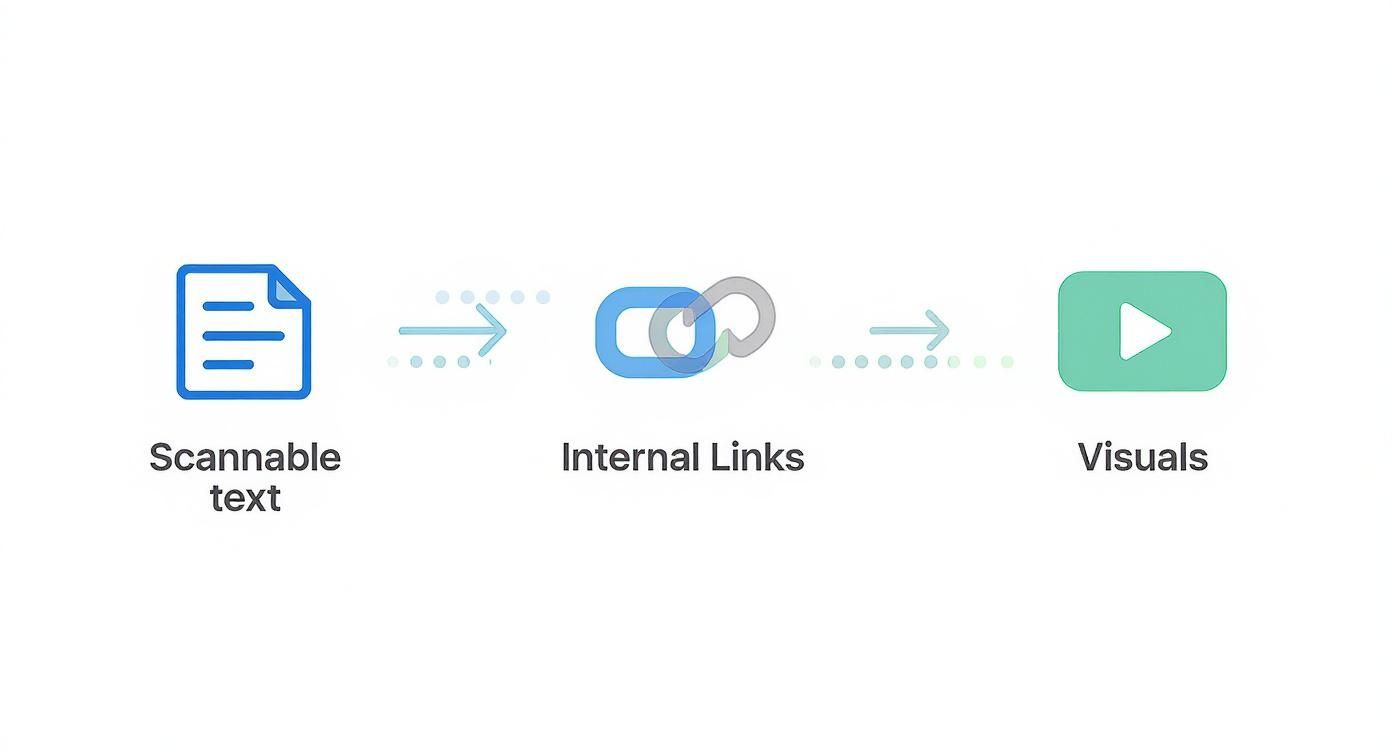
As you can see, things like scannable text, clear internal links, and compelling visuals all work together to hold a visitor's attention and keep them from bouncing.
The Technical Tune-Up: Minifying Code
Okay, "minifying CSS and JavaScript" might sound a bit technical, but the concept is really simple. Your website's code files often have extra spaces, comments, and line breaks that help developers read them but are completely useless to a browser.
Minification is just the process of stripping out all that unnecessary fluff. It makes the code files smaller, so they download and run faster. Think of it like taking a long, detailed recipe and turning it into a super-short, coded version for a pro chef who already knows the basics.
Most performance plugins for platforms like WordPress, Shopify, or Webflow handle minification automatically. The key takeaway here is simple: smaller files mean faster load times, which directly leads to a lower bounce rate.
Understanding the importance of speed and performance for your website is the first step toward building a site that doesn’t just attract visitors, but actually convinces them to stick around. By compressing images, setting up caching, and cleaning up your code, you can win the battle for speed and create an experience that keeps users engaged.
Using Analytics to Uncover Why People Leave
You can't fix what you can't measure. Before you start guessing why visitors are leaving your site in droves, you need to dive into your analytics. This is where the real work begins—turning raw data into a clear diagnosis of your bounce rate problem.
Think of your analytics platform, like Google Analytics 4 (GA4), as your detective's toolkit. It’s packed with clues that can help you solve the mystery of the bouncing visitor. The trick is knowing where to look and what questions to ask.
Pinpointing Your Problem Pages
First things first: not all bounces are created equal. Some pages will naturally have higher bounce rates. A visitor landing on your contact page, grabbing your phone number, and leaving is technically a bounce, but it's also a successful visit. A high bounce rate on a key service or product page, however, is a huge red flag.
Start by identifying your top exit pages. In GA4, you can customize the "Pages and screens" report to show the bounce rate for each page. Hunt for pages that get a lot of traffic but have a bounce rate that's way higher than your site average.
These are your primary suspects. Once you have a list, you can start asking targeted questions. Is it a blog post with a clickbaity title? A service page with confusing copy? Or maybe a landing page that doesn't deliver on its ad's promise? This list gives you a clear starting point for your investigation.
Segmenting Your Audience for Deeper Clues
A site-wide bounce rate is just the headline; the real story is buried in the details. By segmenting your data, you can slice your audience into smaller, more specific groups to uncover hidden patterns. This is where you'll find those "aha!" moments that lead to real breakthroughs.
Try breaking down your traffic by these dimensions:
- Traffic Source: Are visitors from your paid social media ads bouncing more than those from organic search? This often signals a mismatch between your ad creative and your landing page content.
- Device Type: Is your mobile bounce rate through the roof compared to desktop? That's a classic sign of a poor mobile experience. Maybe your buttons are too small to tap, or the text is just impossible to read on a small screen.
- New vs. Returning Visitors: If new visitors are bouncing at an alarming rate, your first impression might be falling flat. Maybe your value proposition isn't clear enough for someone who's never heard of your brand.
For instance, imagine you discover that visitors from a specific referral site have a 90% bounce rate. A quick check might reveal that the referring article positions your service as a free tool when it's actually a premium product. Boom. That expectation mismatch is your culprit.
"Data tells you what's happening, but you need to add context to understand why. Segmenting your audience is how you move from observation to actionable insight."
By isolating these variables, you can stop making broad assumptions and start addressing the specific issues affecting different groups of users. This targeted approach is way more effective at making meaningful improvements.
Going Beyond Numbers With Qualitative Tools
Numbers tell you what is happening, but they almost never tell you why. A 75% bounce rate on a page screams "problem," but it doesn't tell you if it's because of a confusing layout, a broken link, or unclear pricing. To get that kind of insight, you need to see your website through your users' eyes.
This is where behavior analytics tools are worth their weight in gold.
Heatmaps
Heatmaps give you a visual breakdown of where users click, move their mouse, and scroll. You might discover that people are furiously clicking on a non-clickable image, signaling a design flaw. Or maybe a scroll map shows that 80% of visitors never make it past the fold, meaning your most important call-to-action is going completely unseen.
Session Recordings
These are anonymous video playbacks of actual user sessions. Watching a session recording is like looking over a user's shoulder as they navigate your site. You can see exactly where they get stuck, where they hesitate, or the precise moment they give up and leave. It’s an incredibly powerful way to build empathy and uncover usability issues you'd never spot in a data table.
When you combine the quantitative data from GA4 with the qualitative insights from these tools, you get the full picture. You can identify a problem page with analytics, then use a heatmap or session recording to diagnose the exact UX issue that's causing people to bounce. This powerful one-two punch is your best strategy for systematically crushing your bounce rate.
Common Questions About Bounce Rate
Even with a solid plan, a few persistent questions always seem to pop up when you start digging into bounce rate. Let's clear the air and tackle some of the most common ones I hear, so you can focus your energy where it actually counts.
What Is a Good Bounce Rate Anyway?
There’s no magic number here. A “good” bounce rate is completely dependent on your industry and, more importantly, the type of page you’re looking at. For an e-commerce site, you'd want to see a bounce rate somewhere between 20% and 45%. Anything lower usually signals strong buying intent.
But for a blog or a news article? The story is totally different. It's not uncommon to see rates as high as 70-90%, and that’s not necessarily a disaster. Think about it: someone might land on your blog post, find the exact answer they were looking for, and leave feeling satisfied. That high bounce rate just reflects a quick, successful visit.
A much better question to ask is, "What's a normal bounce rate for this specific type of page in my industry?" Focus on beating your own benchmarks, not chasing some universal average.
Does Bounce Rate Affect My SEO Rankings?
While Google has never come out and said that bounce rate is a direct ranking factor, the two are definitely connected. A consistently high bounce rate is often a symptom of bigger problems that Google does care about—things like a poor user experience, content that misses the mark on search intent, or painfully slow page speeds.
So, while the bounce rate itself might not be the direct cause of a rankings drop, it's a huge red flag for issues that will absolutely hurt your SEO. When you fix the root causes—like a clunky mobile design or misleading page titles—you're not just lowering your bounce rate. You're improving factors that Google's algorithm rewards, which leads to better rankings over time.
My Bounce Rate Is High. Is That Always Bad?
Not at all. Context is everything.
Like we talked about, a high bounce rate on an informational page—a blog post, an FAQ—can actually be a good thing. It often means the user found their answer quickly and left. That's a win. The same goes for a contact page; if someone lands there just to grab your phone number or address, they’re going to bounce.
But a high bounce rate on a critical conversion page? That's a different story. If people are bouncing from a product page, a service landing page, or a checkout form, you've got a serious problem. It points to a major roadblock in your customer's journey that's probably costing you sales. You have to analyze bounce rate on a page-by-page basis.
- Good High Bounce Rate Example: A user lands on your contact page, finds your business hours, and immediately leaves to come visit your store. Mission accomplished.
- Bad High Bounce Rate Example: A potential customer lands on your main product page and leaves without even clicking "Add to Cart." That's a lost opportunity.
Understanding this difference is critical. It tells you where to focus your efforts and how to read the story your analytics are telling you.
At Gidds Media, we turn these insights into action. We build and optimize websites that not only attract visitors but also give them every reason to stay, engage, and convert. If you're ready to transform your site into a powerful tool for growth, get your free SEO audit today.